Defining Business Calendars
To define business calendars, use the Business Calendar component (BUS_CALENDAR_HOL).
Page Used to Define Business Calendars
| Page Name | Definition Name | Usage |
|---|---|---|
|
BUS_CALENDAR_HOL |
Create a list of holidays and nonworking days for PeopleSoft applications. General Ledger uses the business calendar to verify that the journal date is a working day. You also assign business calendars to bank accounts to identify the normal working week and bank holidays. |
Business Calendar Page
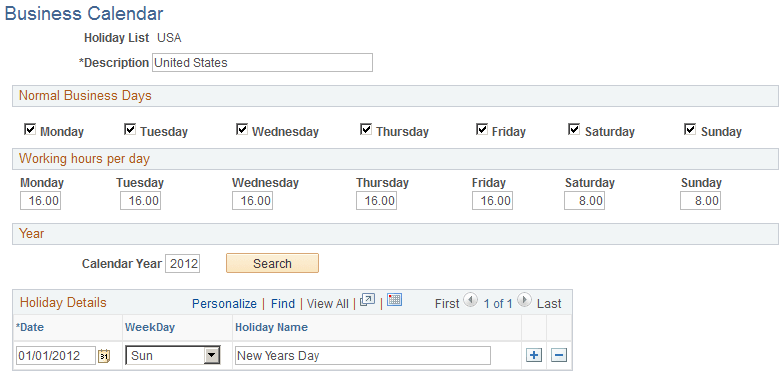
Use the Business Calendar page (BUS_CALENDAR_HOL) to create a list of holidays and nonworking days for PeopleSoft applications.
General Ledger uses the business calendar to verify that the journal date is a working day. You also assign business calendars to bank accounts to identify the normal working week and bank holidays.
Navigation:
This example illustrates the fields and controls on the Business Calendar page. You can find definitions for the fields and controls later on this page.
Setting Up a Business Calendar
To set up a business calendar:
-
Enter a description of the calendar, such as the name of a country or business unit.
-
Select the normal business days of the week to include.
-
Enter the total hours worked each day of the week.
-
Enter the calendar year of the holidays.
-
Click the Search button to enter, delete, or display holidays for the entered year.
-
Add rows with the date and holiday name for each holiday in that year.
The system displays the day of the week.