Using TimeSpans
To define TimeSpans, use the TimeSpans component (TIME_SPAN).
Page Used to Set Up TimeSpans
| Page Name | Definition Name | Usage |
|---|---|---|
|
TIME_SPAN |
Define TimeSpans for ledger reports or inquiries. |
TimeSpans Page
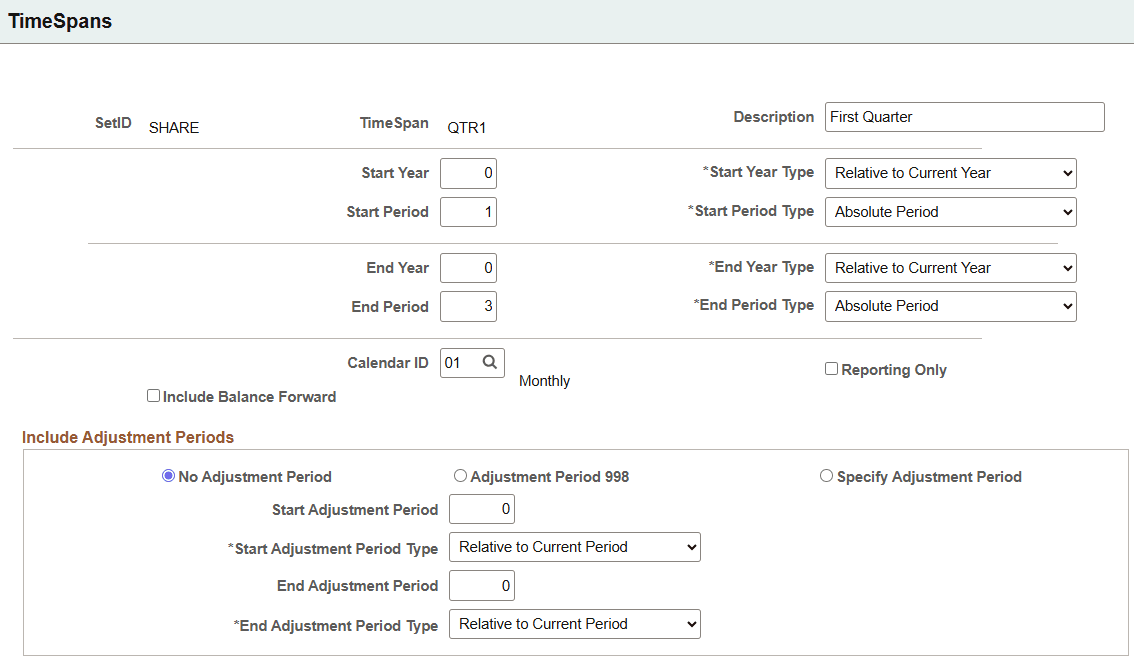
Use the TimeSpans page (TIME_SPAN) to define TimeSpans for ledger reports or inquiries.
When you select and retrieve ledger balances for use in allocations, inquiries, and PS/nVision reporting, TimeSpans control the number of periods for which data is extracted and summarized from the ledger table.
Navigation:
This example illustrates the fields and controls on the TimeSpans page. You can find definitions for the fields and controls later on this page.
| Field or Control | Description |
|---|---|
|
Start Year and End Year |
Specify years based on the value that you select in the adjacent Type field. |
|
Start Year Type and End Year Type |
Select from the following values: Absolute Year: Enter any year defined in the calendar that you select for Calendar ID. Relative to Current Year: Enter 0 to select the current year, –1 to indicate the previous year, 1 to indicate the next year, and so forth. |
| Field or Control | Description |
|---|---|
|
Start Period and End Period |
Specify the period based on the value that you select in the adjacent Type field. |
|
Start Period Type and End Period Type |
Select from the following values: Absolute Period: Enter any period defined in the calendar that you select for Calendar ID. Relative to Current Period: Enter 0 to select the current period, −1 to indicate the previous period, 1 to indicate the next period, and so forth. |
| Field or Control | Description |
|---|---|
|
Include Balance Forward |
Select to include beginning balance amounts when using this TimeSpan. Because TimeSpans represent contiguous periods, if you include balance-forward amounts, you must also select period 1 and Absolute Year (the first period of the year) as the start period. |
|
Reporting Only |
Select to indicate that this timespan is to be used for reporting purposes only. Only reporting timespans can use a value of 999 as an absolute period in the Start Adjustment Period and End Adjustment Period fields. |
|
No Adjustment Period |
Select to exclude adjustment amounts from this TimeSpan. |
|
Adjustment Period 998 |
Select to include adjustment amounts if you have only one adjustment period, the default period 998, defined for the selected calendar. |
|
Specify Adjustment Period |
Select to include adjustment amounts if you have created multiple adjustment periods for the calendar selected in Calendar ID. |
| Field or Control | Description |
|---|---|
|
Start Adjustment Period and End Adjustment Period |
Specify the start and end adjustment periods for the TimeSpan. The values that you enter here depend on which values that you select in the adjacent Type fields: Relative to Current Period or Absolute Period. To include specific adjustment periods such as the first quarter, enter 901 and 903 in these fields, and Absolute in the Type fields. If the Reporting Only check box is selected, you can enter a value of 999 in these fields. |
The following pages use TimeSpan configuration. However, Reporting Only timeSpans are ignored on these pages:
-
Budget Copy Definition
-
Equitization Groups
-
Define Allocation Step
-
Define Translation Rules
-
Define Consolidation Set
-
Translation Within Ledger
-
Define Revaluation Step
-
Reconciliation Rule