Integrating with Oracle Internet of Things Asset Monitoring Cloud Service
Understanding the Integration with Oracle Internet of Things Asset Monitoring Cloud Service
When you integrate PeopleSoft Asset Management with Oracle Internet of Things (IoT) Asset Monitoring Cloud Service, you can synchronize select asset data with IoT. Synchronizing with IoT improves asset tracking and maintenance by accessing real-time visibility to an asset’s location, condition, and utilization. PeopleSoft Asset Management integration with IoT leverages assets already configured in PeopleSoft, so there’s no duplicate entry required. With this integration, you can:
-
Monitor an asset's location, condition, and utilization in real-time.
-
Identify out-of-tolerance readings for an IoT asset and generate incidents within IoT that send condition-based monitoring alerts to PeopleSoft Maintenance Management.
Only those assets for which sensor data is collected are identified as IoT assets in PeopleSoft and synchronized with IoT.
Steps to Integrate with Oracle Internet of Things Asset Monitoring Cloud Service
The following steps are required to integrate with Oracle Internet of Things (IoT) Asset Monitoring Cloud Service:
-
Specify connectivity and REST URI details required for integrating with PeopleSoft using the IOT Integration Page.
-
Select the IoT Installed option on the Application Fundamentals: Installation Options - Asset Management Page.
-
Define IOT (IoT setup) job recurrence option and schedule the job run frequency using the Job Definition Options and Schedule JobSet Definition Pages.
This job loads IoT organization, place name, and asset type information into PeopleSoft.
-
Select the IoT Asset option on the Asset Basic Add - PeopleSoft Asset Management: General Information Page to indicate the asset is an Oracle IoT asset and equipped with the required sensor.
-
Assign IoT attributes to your asset using the PeopleSoft Asset Management: IoT (Internet of Things) Page.
-
Export existing PeopleSoft assets into Oracle IoT using the PeopleSoft Asset Management: Upload Assets to IoT (Oracle Internet of Things) Page.
This page saves you time and effort by enabling you to export all your PeopleSoft assets into Oracle IoT (in lieu of manual entry).
-
Define IOTALERT job recurrence option and schedule the job run frequency using the Job Definition Options and Schedule JobSet Definition Pages.
This job loads IoT incidents to PeopleSoft so that a Condition Based Maintenance Alert can be created in Maintenance Management.
See also: PeopleSoft Maintenance Management: Condition-Based Maintenance Alert Page.
Pages Used to Integrate with Oracle Internet of Things Asset Monitoring Cloud Service
| Page Name | Definition Name | Usage |
|---|---|---|
|
AM_IOT_INSTANCE |
Specify connectivity, IoT instance details, and property information required for integrating with Oracle Internet of Things Asset Monitoring Cloud Service. |
|
|
Application Fundamentals: Installation Options - Asset Management Page |
INSTALLATION_AM |
Review delivered transaction types, enable asset processing features, enable depreciation attributes, set system-wide options, and enable Asset Lifecycle Management solution integration options. |
|
ASSET_GENERAL_01 |
Add asset basic information manually or modify existing asset information. |
|
|
AM_IOT |
Assign Internet of Things attributes to your asset and monitor changes to the asset. |
|
|
PRCSJOBDEFN2 SCHDLDEFN |
Define the recurrence option and schedule job run frequency for the IOT and IOTALERT jobs. |
|
|
PeopleSoft Asset Management: Upload Assets to IoT (Oracle Internet of Things) Page |
IOT_ASSET_BULK |
Export PeopleSoft assets into Oracle Internet of Things Asset Monitoring Cloud Service. |
IOT Integration Page
Use the IoT Integration page (AM_IOT_INSTANCE) to specify connectivity, IoT instance details, and property information required for integrating with Oracle Internet of Things Asset Monitoring Cloud Service.
Navigation:
This example illustrates the fields and controls on the IoT Integration page.
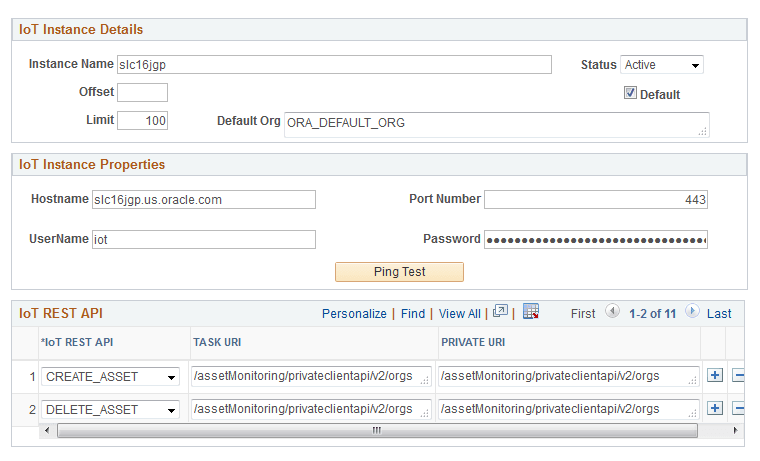
PeopleSoft delivers the required Rest APIs and URIs details required for integrating with Oracle Internet of Things; you need only specify IoT instance detail and property information.
| Field or Control | Description |
|---|---|
|
Instance Name |
Enter a name for this instance. |
|
Status |
Select a status for the instance (active or inactive). |
|
Offset |
Enter the number that the first record of results is starting from. |
|
Default |
Select this option to indicate this instance is the default instance to integrate with. |
|
Limit |
Enter the maximum number of records allowed. |
|
Default Org (Default Organization) |
Enter a name for the default organization. |
|
Hostname |
Enter the server name of the host where the Oracle IoT instance is running, including the domain. The host name value can be a DNS name or an IP address. |
|
Port Number |
Enter the port on which the Oracle IoT instance is hosted. The default is 443 for SSL |
|
User Nameand Password |
Enter the user name and password to connect to this instance. |
Note:
Every instance of IoT that you need to integrate with requires an administrator configure IoT instance details.
Job Definition Options and Schedule JobSet Definition Pages
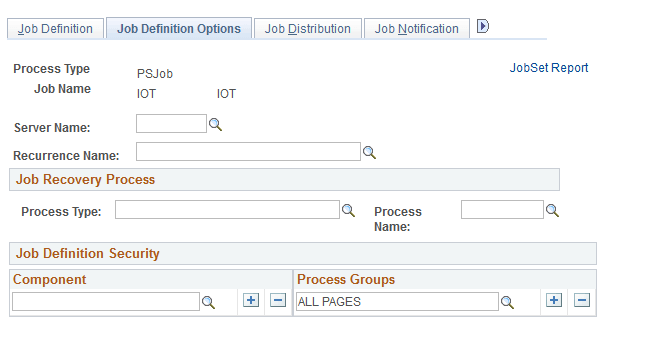
Use the Job Definition Options and Schedule JobSet Definition pages (PRCSJOBDEFN2 and SCHDLDEFN) to define the recurrence option and schedule job run frequency for the IOT and IOTALERT jobs.
Navigation:
Navigation:
This example illustrates the fields and controls on the Job Definition Options page.
This example illustrates the fields and controls on the Schedule JobSet Definition page.
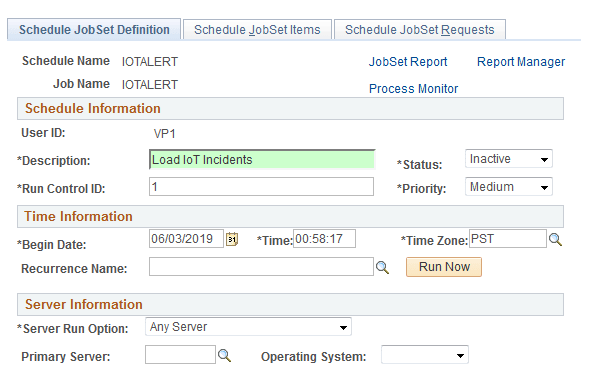
PeopleSoft delivers the IOT and IOTALERT jobs. The IOT job loads IoT organization, location, and asset type information into PeopleSoft. The IOTALERT job loads IoT incidents to PeopleSoft so that a Condition Based Maintenance Alert can be created in Maintenance Management.
Because the job data is delivered, you need only define the recurrence option and schedule job run frequency for the jobs using the Job Definition Options and Schedule JobSet Definition pages.
For more information on how to use these pages, see the PeopleTools Process Scheduler documentation.