Approving Changes
You can approve multiple interface transaction rows and also change the Approval and Load status for multiple rows at once.
This topic discusses how to approve financial and physical loader data.
Pages Used to Approve Changes
| Page Name | Definition Name | Usage |
|---|---|---|
|
AM_INTFC_TXN_APPR |
View and approve interface transaction data. |
Approve Page
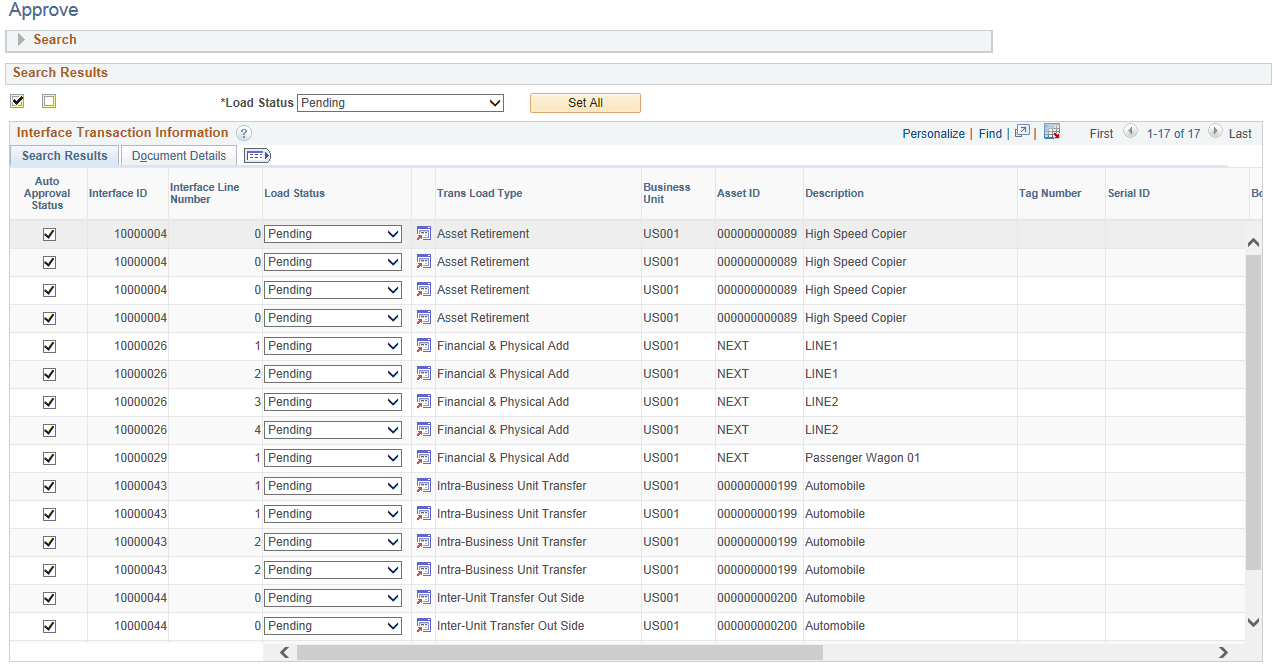
Use the Approve page (AM_INTFC_TXN_APPR) to view and approve interface transaction data.
Navigation:
This example illustrates the fields and controls on the Approve Page. You can find definitions for the fields and controls later on this page.
To set up search configuration, see PeopleSoft IT Asset Management: Setting Up Common Search Configuration
When a search is performed to approve transaction, if any rows are returned, the Search group box is collapsed and the Search Results are displayed.
| Field or Control | Description |
|---|---|
|
Load Status |
Select the desired status in the Search Results group box and click Set All button to change the load status for all the rows. |
|
Auto Approval Status |
Approve or reject each transaction by selecting or deselecting the Auto Approval Status check boxes. You can also use the Select All/ Deselect All check boxes to select/ clear all the rows. |
You can also click the drill down icon for each row to open a new window displaying that transaction in the Review Transaction component.