Business Unit AP/PO Transactions Page
Use the Business Unit AP/PO Transactions page (AM_WC_PREAM_PENDBU) to review and act on pending AP or PO transaction data. Transaction data is organized by business unit. This page shares similar functionality with the AP/PO Transactions page and you can use either page to review and act on pending AP or PO transaction data.
Navigation:
This example illustrates the fields and controls on the Business Unit AP/PO Transactions page. You can find definitions for the fields and controls later on this page.
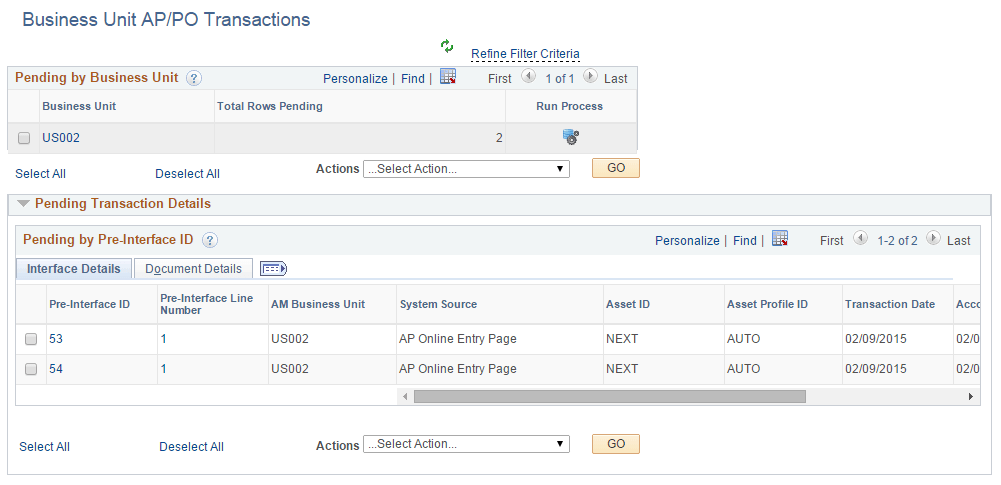
This example illustrates the fields and controls on the Business Unit AP/PO Transactions page. You can find definitions for the fields and controls later on this page.
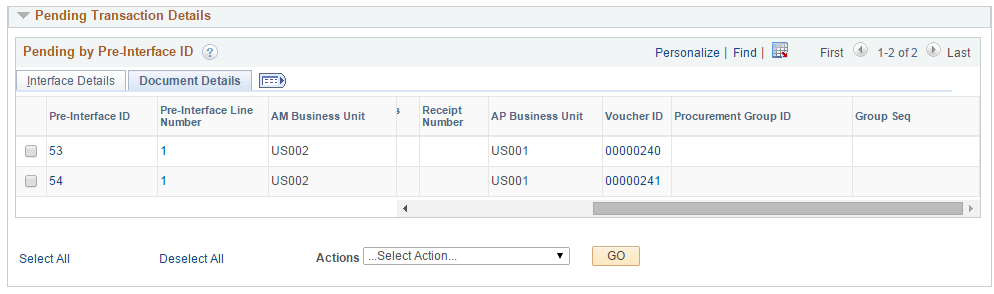
| Field or Control | Description |
|---|---|
|
Business Unit |
Displays business units that have pending pre-interface transactions. Select a business unit to:
Click a business unit link to display related pre-interface transaction details in the Pending Transaction Details group box. |
|
Total Rows Pending |
Displays the total number of pending rows for a business unit. |
|
Run Process |
Click the icon to run the Payables/Purchasing Interface process (AMPS1000) for the corresponding business unit in the row. The AMPS1000 process loads data from Payables or Purchasing to Asset Management interface tables (INTFC_FIN, INTFC_PHY_A and INTFC_PHY_B). |
|
Actions |
Perform an action on one or more items that you select on the page, and click the GO button. Choose from these actions:
|
|
Go |
Click to perform an action. |
Pending Transaction Details
| Field or Control | Description |
|---|---|
|
Pre-Interface ID |
Displays the pre-interface IDs associated with a selected business unit. Select a pre-interface ID to perform an action against it (retrieve Info from AP/PO or Load Into AM). When you select a pre-interface ID, all related rows with the same ID are automatically selected as well. Once you process a pre-interface ID, you will not be able to select it again for future processing. Click the Pre-Interface ID link to open the Load Preview Pre-AM page. |
|
Pre-Interface Line Number |
Displays the line number associated with a pre-interface ID. Click the Pre-Interface Line Number link to open the Load Preview Pre-AM page. |
|
AM Business Unit |
Displays the business unit associated with the pre-interface ID. |
|
System Source |
Identifies the source of an accounting entry from which a transaction arises. |
|
Asset ID |
Displays the asset ID associated with the pre-interface ID. |
|
Asset Profile ID |
Displays the asset profile ID associated with the pre-interface ID. |
|
Transaction Date |
Displays the transaction date associated with the pre-interface ID. |
|
Accounting Date |
Displays accounting date associated with the pre-interface ID. |
|
Load Status |
Displays the load status associated with the pre-interface ID. |
|
PO Business Unit |
Displays the PO business unit associated with the pre-interface ID. |
|
PO Number |
Displays the PO number associated with the pre-interface ID. Click the PO Number link to open the Purchase Order Inquiry page. |
|
Receiving Business Unit |
Displays the receiving business unit associated with the pre-interface ID. |
|
Receipt Number |
Displays the receipt number associated with the pre-interface ID. Click the Receipt Number link to open the Receiver Line page. |
|
AP Business Unit |
Displays the AP business unit associated with the pre-interface ID. |
|
Voucher ID |
Displays the voucher ID associated with the pre-interface ID. Click the Voucher ID page to open the Voucher Inquiry page. |
|
Procurement Group ID |
Displays the procurement group ID associated with the pre-interface ID. |
|
Group Seq (Group Sequence) |
Displays the group sequence number associated with the pre-interface ID. |