Mobile Physical Inventory and Classic Physical Inventory
PeopleSoft Asset Management provides two methods to perform physical inventory:
-
Classic physical inventory (the physical inventory method delivered prior to PeopleSoft Image 9.2.016).
-
Mobile physical inventory (the physical inventory method delivered with PeopleSoft Image 9.2.016).
You can use either method to perform physical inventory. However, there are key differences you should understand.
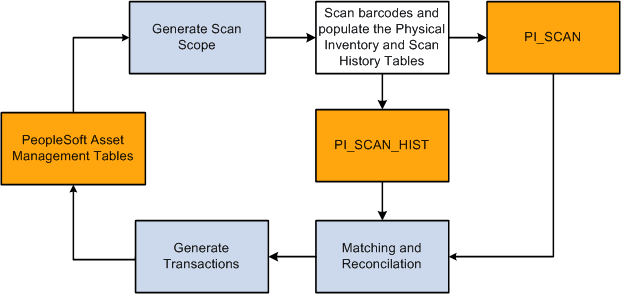
The mobile physical inventory method enables you to scan assets, retrieve and display real-time asset information from the Asset Repository, and automatically populate the Physical Inventory (PI_SCAN) interface and Scan History (PI_SCAN_HIST) tables with scan records—all from your mobile scanning device and without the use of a third party scanning solution. The classic physical inventory method requires a third party scanning solution and necessitates that you use flat files to populate the Physical Inventory interface table with scan records.
The mobile physical inventory method automatically maintains asset scan history in the Scan History (PI_SCAN_HIST) table. When an asset or tag is scanned, this table records the date and time it was scanned. If an asset is scanned again, another record is inserted into the table. The previous record remains to provide a history. The Scan History table is not used with the classic physical inventory method.
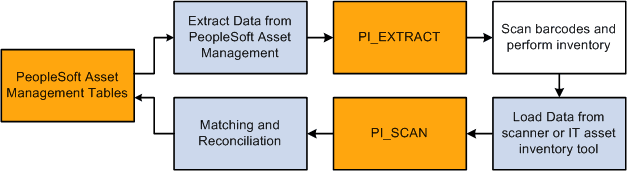
The classic physical inventory method requires you to extract assets and generate an extract file, then load the scan file back into Asset Management to create a set of all assets that you might scan during a physical inventory. However, with the mobile physical inventory method you can simply run the Generate Scan Scope process to create a list of assets that you expect to scan. With the Generate Scan Scope process, if an asset is scanned and not found in the Scan Scope, the asset is automatically retrieved directly from the Asset Repository.
Because the mobile physical inventory method does not require flat file downloads and uploads, or an extract scope, there are fewer processing steps than the classic method.
The following diagrams provide a high–level process flow of the two physical inventory methods:
The following diagram illustrates the Classic physical inventory method.
The following diagram illustrates the Mobile physical inventory method