Running the Group Member Estimated Net Book Value Report
This topic provides an overview of the estimated net book value calculation and discusses how to run the Group Member Estimated Net Book Value (NBV) report.
Page Used to Run the Group Member Estimated Net Book Value Report
| Page Name | Definition Name | Usage |
|---|---|---|
|
RUN_AMDP2150_RPT |
Estimate the net book value (NBV) of an asset member before selling the asset. |
Understanding the Estimated Net Book Value Calculation
The Group Member Estimated Net Book Value (NBV) report enables you to estimate the net book value of asset members. The report provides the estimated accumulated depreciation of the member by using the following formula:
Cost of member (cost) − Estimated life-to-date depreciation of member, using historical rate of the group (expense) = Estimated net book value
Note:
The report provides only an estimate of the NBV.
Related Topics
Group Member Estimated NBV Page
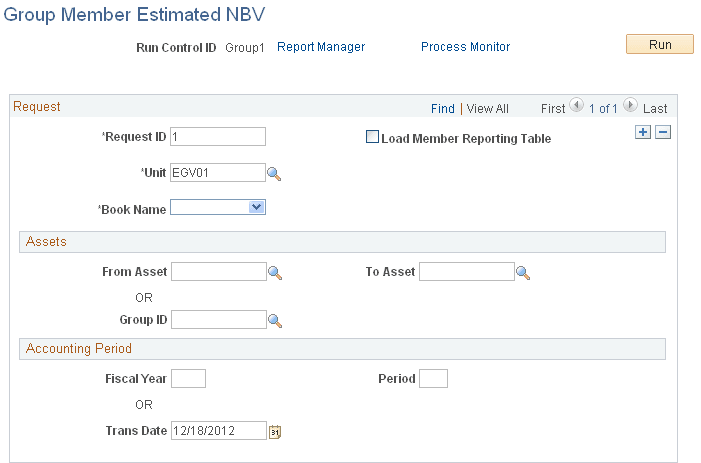
Use the Group Member Estimated NBV page (RUN_AMDP2150_RPT) to estimate the net book value (NBV) of an asset member before selling the asset.
Navigation:
This example illustrates the fields and controls on the Group Member Estimated NBV page. You can find definitions for the fields and controls later on this page.
Note:
The business unit and book name must be associated with a group asset.
| Field or Control | Description |
|---|---|
|
Load Member Reporting Table |
Select to record the member accumulated depreciation. If this check box is not selected, the report is printed and the member accumulated depreciation is not recorded in the table (DEPR_RPT_MEM). |