Transferring Parent-Child Assets to Other Business Units (Interunit Transfers) In Mass
Use the Parent-Child IU Transfer (AMPC_IUT_RQST) component to transfer parent-child assets from one business unit to another. The transfer process uses the application engine AM_PARCHD_IU.
This topic discusses how to transfer parent-child assets from one business unit to another.
Page Used to Transfer Parent-Child Assets to Other Business Units In Mass
| Page Name | Definition Name | Usage |
|---|---|---|
|
AMPARCHDIU_RQST |
Run the AM_PARCHD_IU Application Engine process to transfer Parent-Child assets from one business unit to another. |
Parent-Child IU Transfer Page
Use the Parent-Child IU Transfer page (AMPARCHDIU_RQST) to run the AM_PARCHD_IU Application Engine process to transfer Parent-Child assets from one business unit to another.
Navigation:
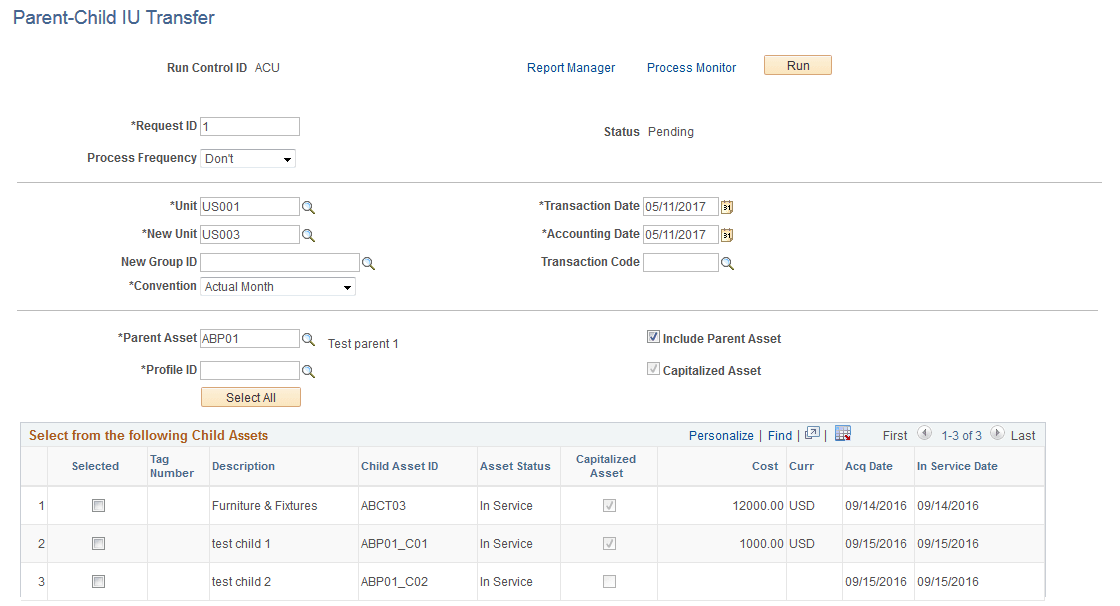
This example illustrates the fields and controls on the Parent-Child IU Transfer page. You can find definitions for the fields and controls later on this page.
| Field or Control | Description |
|---|---|
|
Unit |
Select the business unit from which you are transferring assets. |
|
New Unit |
Select the acquiring business unit. |
|
New Group ID |
This field displays when the New Unit field points to a Group Asset business unit. This is used when you want to extend parent/child functionality to group assets. |
|
Convention |
Select the depreciation convention. |
|
Transaction Date |
Enter the transaction date. |
|
Accounting Date |
Enter the accounting date for the transaction. |
|
Transaction Code |
Identifies which accounting entry template to use for this transaction. Only valid combinations for which accounting entry templates exist are accepted. |
|
Parent Asset |
Select the parent asset from which you are transferring assets. |
|
Profile ID |
Select an ID that is valid for the new business unit to set up book reporting. |
|
Include Parent Asset |
Deselect this check box to transfer all or selected child assets at once while leaving the parent asset out of the transaction. |
|
Capitalized Asset |
Indicates whether the parent asset is capitalized or non capitalized. |
The Select from the following Child Assets results grid displays child asset description, ID, status, capitalization status, and so forth.