Setting Up Financial Gateway Security for Banking Pages
This topic describes how to use Financial Gateway security components to set up security for bank reconciliation pages.
To define security user assignments, use the Security User Assignment component (PMT_SEC_USER_GBL). To define payment security rules, use the Payment Security Rules component (PMT_SEC_RULE_GBL).
Before you begin, ensure that Cash Management is selected on the Installations Options - Products page.
Pages Used to Set Up Financial Gateway Security for Banking Pages
| Page Name | Definition Name | Usage |
|---|---|---|
|
PMT_SEC_OPTIONS |
Activate security based on user or role and enable secured fields used on banking pages and components. See also PeopleSoft Financial Gateway: Activating Payment Security. |
|
|
PMT_SEC_RULE |
Define banking security rules that can be assigned to users or roles. See also PeopleSoft Financial Gateway: Creating Payment Security Rules. |
|
|
Security Role Assignment Page |
PMT_SEC_ROLE |
Assign banking security rules to a role. See PeopleSoft Financial Gateway: Assigning Payment Security Rules. |
|
Security User Assignment Page |
PMT_SEC_USER |
Assign banking security rules to a user. See PeopleSoft Financial Gateway: Assigning Payment Security Rules. |
Security Options Page
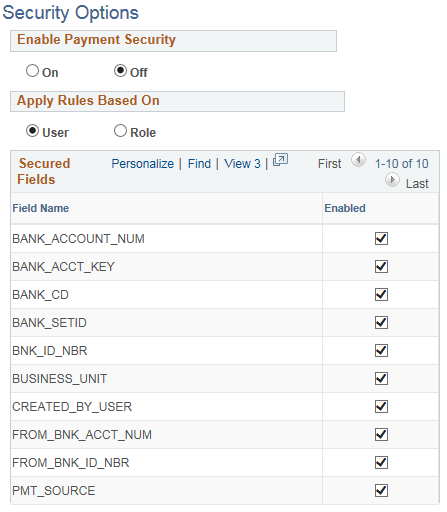
Use the Security Options page (PMT_SEC_OPTIONS) to activate security based on user or role and enable secured fields used on banking pages and components.
Navigation:
This example illustrates the fields and controls on the Security Options page.
| Field or Control | Description |
|---|---|
|
Secured Fields |
Select the check box for the field names you would like to secure. Fields not enabled on this page are not available for selection in the Field Name field on the Security Rules page. The options for bank statement security are:
You can use the following fields for both payment security in Financial Gateway and security on banking pages:
Use the remaining fields for payment security in Financial Gateway. For more information, seePeopleSoft Financial Gateway: Activating Payment Security. |
Security Rules Page
Use the Security Rules page (PMT_SEC_RULE) to define banking security rules that can be assigned to users or roles.
Navigation:
This example illustrates the fields and controls on the Security Rules page, showing a sample rule used for banking pages.
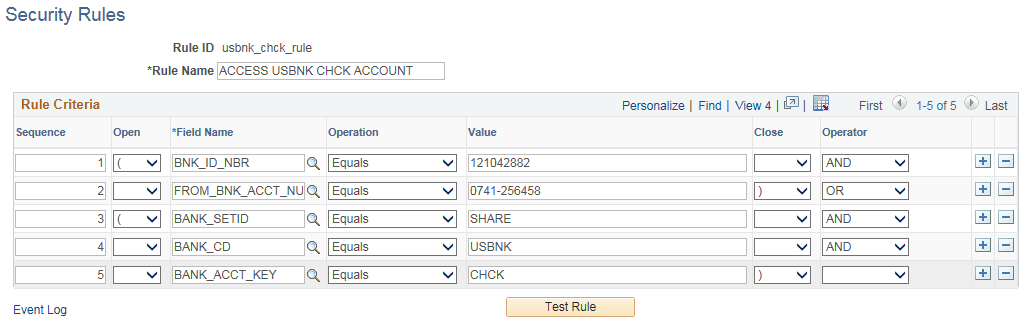
Use the Sequence, Field Name, Operation, Value, Operator, and Open and Close fields to create rules that specifically define which payments are accessible to the roles or users to which the rules are assigned.
Use the open and close column fields for parentheses around SQL statements.
| Field or Control | Description |
|---|---|
|
Test Rule |
Click to run a test on the validity of the rule's logic. |