Configuring and Displaying the Bank Statement Load Chart
Page Used to Configure and Display the Bank Statement Load Chart
| Page Name | Definition Name | Usage |
|---|---|---|
|
TR_DASH_BSL_CFG |
Configure the dashboard to display the Status of Bank Statement Loads chart. |
Dashboard Configuration - Bank Statement Load Page
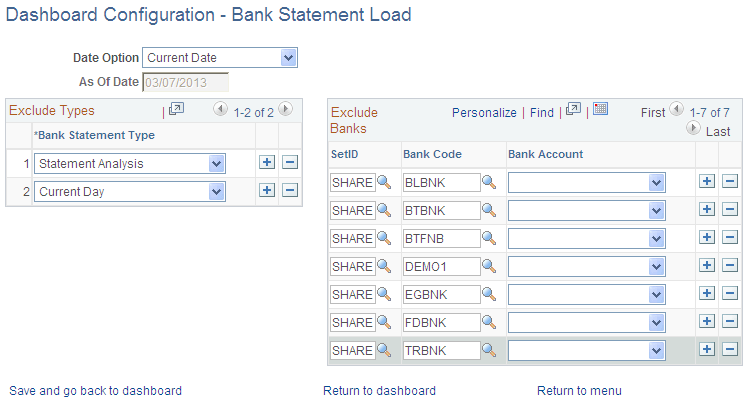
Use the Dashboard Configuration - Bank Statement Load page (TR_DASH_BSL_CFG) to configure the dashboard to display the Status of Bank Statement Loads chart.
This example illustrates the fields and controls on the Dashboard Configuration - Bank Statement Load page.
| Field or Control | Description |
|---|---|
|
Date Option |
Select one of these options.
|
|
Exclude Types |
Add and select the types of bank statements that you want to exclude from displaying on the Bank Statement Load dashboard. |
|
Exclude Banks |
Add and select the bank codes and bank accounts that you want to exclude from displaying on the Bank Statement Load dashboard. |
Status of Bank Statement Loads Chart
Use the Status of Bank Statement Loads chart to see the number of Bank Statements by bank that are not loaded, ready to be reconciled, and completed reconciliation.
This example illustrates the fields and controls on the Status of Bank Statement Loads chart.
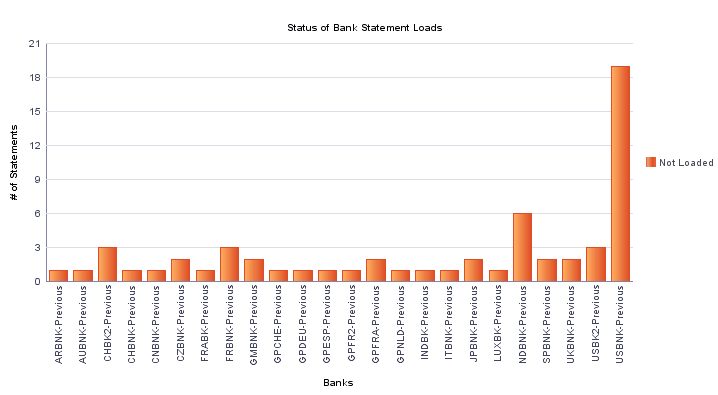
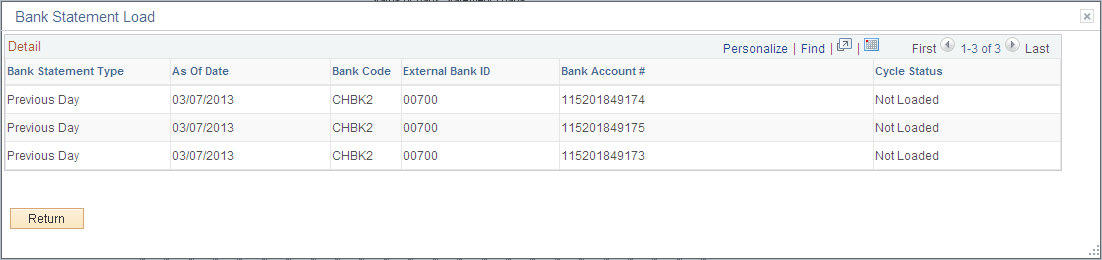
Click on a chart bar to access detail information. The information appears in a grid in a new window.
This example illustrates the fields and controls on the Bank Statement Load detail grid for a bank. You can find definitions for the fields and controls later on this page.
| Field or Control | Description |
|---|---|
|
IBAN |
Displays the international bank account number (IBAN) in addition to the local, domestic bank account number when the country has been set up to display the IBAN on the PeopleSoft Banks Setup and Processing: IBAN Formats Page. |