Monitoring Facilities
Pages Used to Monitor Facilities
| Page Name | Definition Name | Usage |
|---|---|---|
|
TR_AE_RUNCNTL |
Define run parameters for the Monitor Expiring Facilities process. |
|
|
BANK_PNLFCLTY |
Review facilities summary information by counterparty. |
Understanding Monitoring Facilities
Run the Monitor Expiring Facilities Application Engine process (TR_FCLTY_RVW) to determine if your facilities are close to expiring.
View email or worklist notifications generated by the facility review notification method defined on the facility. Refer to your PeopleTools documentation for details about the Virtual Workflow methodology.
To view the details of facility review notifications sent by the Notification Framework, go to , or click the Notification Detail link in the notification email or worklist. For more information, see the product documentation for PeopleSoft Events and Notifications Framework.
Schedule Facility Review Page
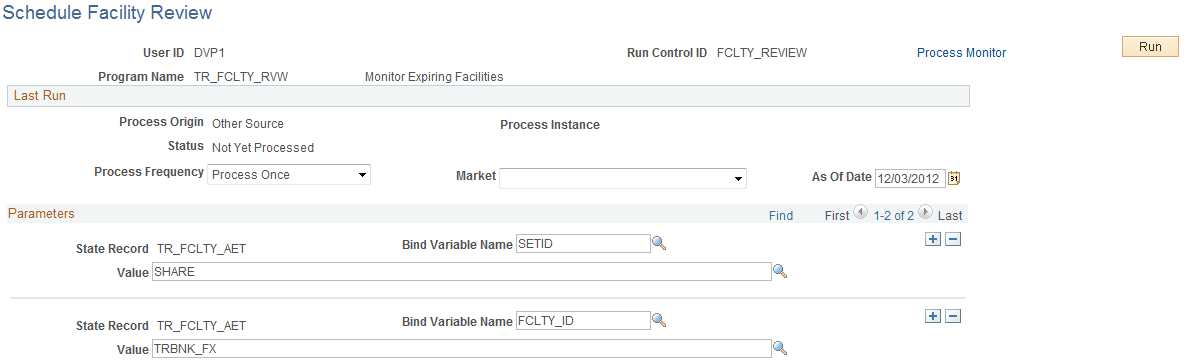
Use the Schedule Facility Review page (TR_AE_RUNCNTL) to define run parameters for the Monitor Expiring Facilities process.
Navigation:
This example illustrates the fields and controls on the Schedule Facility Review page. You can find definitions for the fields and controls later on this page.
| Field or Control | Description |
|---|---|
|
Bind Variable Name |
In the Parameters grid is an Application Engine run control function that enables you to specify the variable for which you are setting the value. Select the Bind Variable Name of FCLTY ID, and enter the specific facility name to be calculated in Value. You can add records and specify as many bind variable names as are pertinent to the job. |