Rolling Back Catalogs to a Previous Version
This topic discusses how to roll back to a previous catalog version.
Page Used to Roll Back Catalogs to a Previous Version
| Page Name | Definition Name | Usage |
|---|---|---|
|
EOCM_CATALOG_RB |
Revert to a previous version of a catalog. |
Understanding Catalog Versioning and Rollbacks
You roll back a catalog when there is a problem with the production version. Rollback enables you to overwrite the current catalog version with whatever version is selected as rolling-back.
For example, if the current version is 5, and you rollback to version 3, version 3 overwrites version 5, leaving the current version as 5 with information from version 3.
Note:
Once the rollback is through, the previous version 5 becomes nonexistent and not recoverable.
Rollback Catalog Page
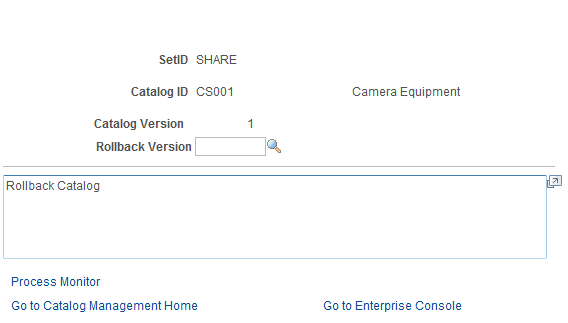
Use the Rollback Catalog page (EOCM_CATALOG_RB) to revert to a previous version of a catalog.
Navigation:
Select an enterprise catalog.
This example illustrates the fields and controls on the Rollback Catalog page. You can find definitions for the fields and controls later on this page.
| Field or Control | Description |
|---|---|
|
Rollback Version |
Select the catalog version to roll back to. |
|
Process Rollback |
Click to run the rollback process. A process request is submitted. Click the Process Monitor link to monitor its status. |
see the product documentation for PeopleTools: Process Scheduler