Syndicating Catalogs
After a catalog has been moved to production, it is ready to be syndicated (distributed) to partners.
Page Used to Syndicate Catalogs
| Page Name | Definition Name | Usage |
|---|---|---|
|
EOCM_CTLG_SYND |
Distribute the catalog to partners. |
Syndicate Catalog Page
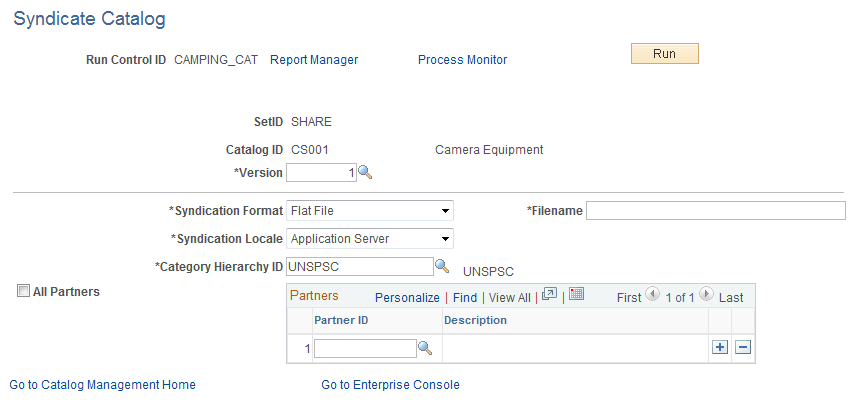
Use the Syndicate Catalog page (EOCM_CTLG_SYND) to distribute the catalog to partners.
Navigation:
Select an enterprise catalog.
This example illustrates the fields and controls on the Syndicate Catalog page. You can find definitions for the fields and controls later on this page.
| Field or Control | Description |
|---|---|
|
Version |
Select a production version of this catalog. |
|
Syndication Format |
Select a format for the syndicated file. Select from CSV, Flat, or xCBL file. Note: If flat file is selected, the category hierarchy structure is not included. |
|
Filename |
Enter a description for the syndicated file. |
|
Syndication Locale |
Select the distribution location for the file, either Application Server or FTP. |
|
Category Hierarchy ID |
Select the category hierarchy to syndicate. The system automatically selects the hierarchy if only a single hierarchy exists for this catalog. |
|
All Partners |
Select to syndicate all partners' offerings in this catalog. |
|
Partner ID |
Select partners individually by ID. Only offerings of the selected partners are syndicated. |
|
Run |
Click to run the syndication process. The process is submitted. Click the Process Monitor link to monitor the status of the process. |
See the product documentation for PeopleTools: Process Scheduler