Defining Securities
This topic discusses how to enter security header information manually and enter security market value information.
Pages Used to Define Securities
| Page Name | Definition Name | Usage |
|---|---|---|
|
TRX_SECURITY_HDR |
Enter and view general information about a security. |
|
|
TRX_SEC_MKTVAL |
View the currency information and market value of a security as of a specified date. The market values can be entered here manually or viewed after being imported using the Securities Market Values Import page. You can record more than one market price. |
Security Header Page
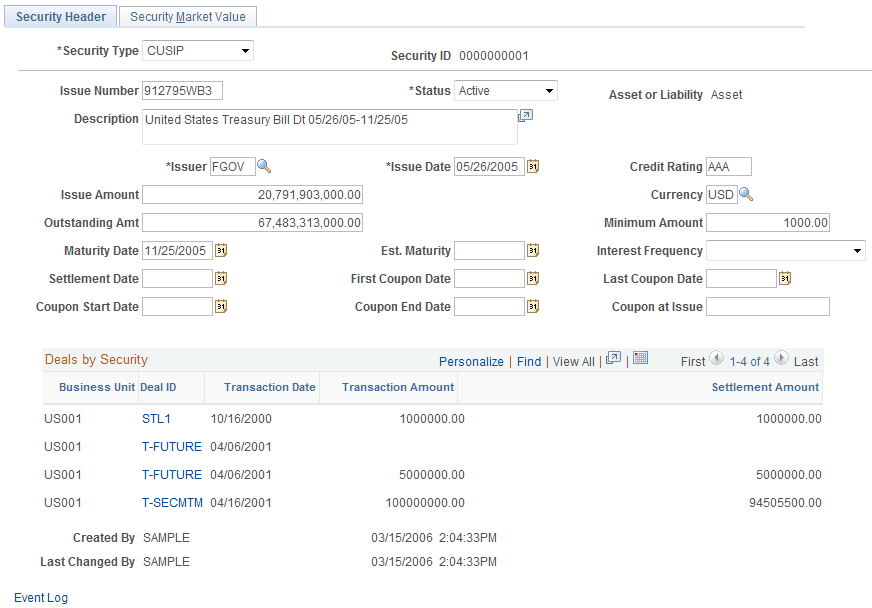
Use the Security Header page (TRX_SECURITY_HDR) to enter and view general information about a security.
Navigation:
This example illustrates the fields and controls on the Security Header page. You can find definitions for the fields and controls later on this page.
| Field or Control | Description |
|---|---|
|
Security Type |
Select the agency that issues the identifier for the security. Options include CINS, CUSIP, EPIC, ISID, ISIN, QUICK, RIC, SEDOL, SICOVAM, and Valoren. |
|
Security ID |
Displays the identifier that you assigned. |
|
Issue Number |
Enter the identifier that is assigned to this security according to the identification system that is selected in the Security Type field. Note: The CUSIP/CINS identifier entered here is validated using check-digit validation logic if a check digit exists for the security. If the security does not have a check digit appended to it, one is derived by the system and appended to the existing CUSIP/CINS identifier. |
|
Coupon at Issue |
Enter the applicable interest rate in decimal format. |
|
Created By and Last Changed By |
User ID and date/time stamp information that enable you to track changes to the security. |
Security Market Value Page
Use the Security Market Value page (TRX_SEC_MKTVAL) to view the currency information and market value of a security as of a specified date.
The market values can be entered here manually or viewed after being imported using the Securities Market Values Import page. You can record more than one market price.
Navigation:
This example illustrates the fields and controls on the Security Market Value page. You can find definitions for the fields and controls later on this page.
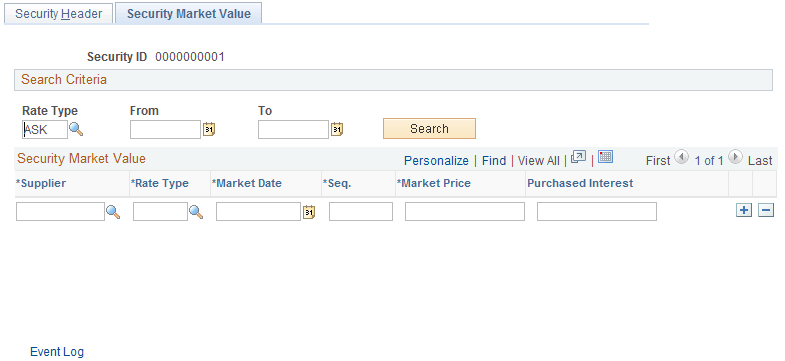
Specify your search criteria and click the Search button; leaving this field blank returns all possible results.
| Field or Control | Description |
|---|---|
|
Seq (sequence) |
Enter a number for each added row of market source information to determine processing order of the valuation. |
|
Market Price |
Enter the price of the security relative to the par value. |
|
Purchased Interest |
Displays the interest calculated from the interest-period, start date to the settlement date. This value is important for securities purchased in a secondary market. For example, bonds usually pay interest every six months, but, interest is accrued by the bondholders on a day-to-day basis. When a bond is sold, the buyer pays the seller the market price plus the accrued interest, for which the buyer is reimbursed when the issuer next pays interest. |