Setting Up Inbound Confirmation Validation
This topic discusses prerequisites and how to define the confirmation and assign automatic inbound confirmation instruments.
Pages Used to Set Up Inbound Confirmation Validation
| Page Name | Definition Name | Usage |
|---|---|---|
|
DAD_CNF_VALCOL |
Define deal-transaction, data fields that are subject to confirmation validation. |
|
|
Instrument Detail Page |
INSTR_DETAIL_TR |
Specify a Confirm Field Validation ID value for use in the inbound confirmations process. See also Instrument Detail Page for more information. |
Prerequisites for Setting Up Inbound Confirmation Validation
To implement the Treasury Inbound Deal Confirmations using Workflow virtual approval technology, go to PeopleSoft Application Designer to define business processes, activities, business events, worklists, routings, and approval rule sets.
The integration between Treasury and Notification Framework will be delivered as system data to support email and worklist notifications, as shown in this table:
| Description | Process Name | Process Category | Navigation |
|---|---|---|---|
|
Automatic Inbound Deal Confo (confirmation) |
TR_NOTIFICATIONS |
AUTO_INBOUND_DEAL_CONFO |
Enterprise Components > Events & Notifications > Notifications Framework > Notifications Registry > Notification Registry |
See the product documentation for PeopleTools: Workflow Technology.
See also Events and Notifications Framework: Understanding Notification Setup.
Inbound Confirmation Validation Page
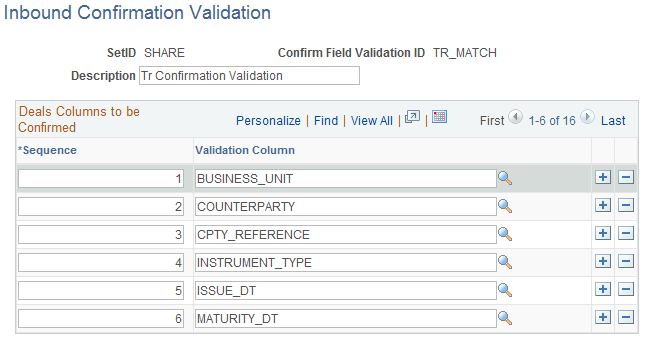
Use the Inbound Confirmation Validation page (DAD_CNF_VALCOL) to define deal-transaction, data fields that are subject to confirmation validation.
To define inbound confirmation validation, use the Inbound Confo Validation component (CONFO_VALIDATION).
Navigation:
This example illustrates the fields and controls on the Inbound Confirmation Validation page.
| Field or Control | Description |
|---|---|
|
Sequence |
Change the sequence number if it differs from the default. |
|
Validation Column |
Indicates the field to be validated. |
Assigning Automatic Inbound Confirmation Instruments
Use the Instrument Detail page (INSTR_DETAIL_TR) to specify a Confirm Field Validation ID value for use in the inbound confirmations process.
Navigation:
| Field or Control | Description |
|---|---|
|
Confirm Field Validation ID |
Select the inbound, confirmation-field definition that identifies which deals columns to use for automatic inbound confirmation. |
Related Topics