Invoice Detail Page
Use the Invoice Detail page (EB_PYCART_INV_SCF) to change the invoice amount in the small form factor design. Add a reason for partial payments.
Navigation:
Click the Show Detail Entry button on the Invoices to Pay page.
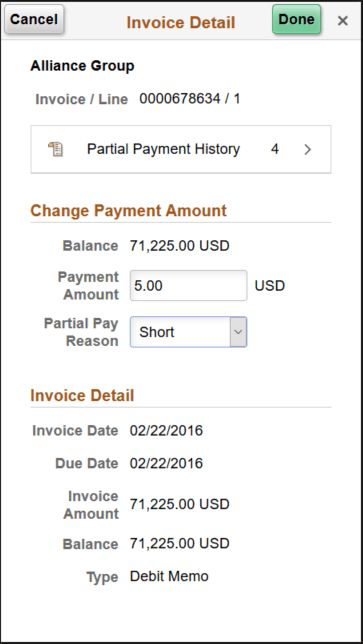
This example illustrates the fields and controls on the Invoice Detail page (SFF only) for a partial payment by credit card. You can find definitions for the fields and controls later on this page.
| Field or Control | Description |
|---|---|
|
Partial Payment History |
Displays the number of payments made for the invoice. Click to open the Partial Payment History page (EB_PYCART_PPAY_SCF), where you can view a list of partial payments with payment information. |
Change Payment Amount
| Field or Control | Description |
|---|---|
|
Payment Amount |
Enter the payment amount for this transaction. |
|
Partial Pay Reason |
Select a reason for partial payments, such as Damaged, Discount, or Short. |
Invoice Detail
View the invoice detail, including invoice date and amount, due date, balance on the invoice, and invoice type.