Establishing a Buyer Template
A buyer template provides defaults and control values for buyer registration and transactions. The buyer template provides a means to create buyers and the underlying PeopleSoft Payables, Purchasing, and General Ledger business units and processing options. You must establish a buyer template before you can run the Enable AP BUs & Suppliers for BD process—and also before you can enable or create buyers online.
To establish a buyer template, use the Maintain Buyer Template component (EM_BUYER_TEMPLATE).
This section discusses the buyer template in the context of both implementation models and discusses how to establish a buyer template.
Note:
In order to save a template all required fields must be populated.
Buyer Direct Model
In the Buyer Direct model, when enabling existing PeopleSoft Payables business units for PeopleSoft eSettlements, the business units and processing options have already been established so the values on the template will not be used for subsequent processing, except for the Account field. This field on the template is the only field used in the Buyer Direct model, and can be used as a default value on self-service and XML invoices. Bank information in the Buyer Direct model is derived using TableSet sharing, rather than the Bank Security table (EM_SEC_BU_BANK), which is used in the Business Service Provider model only.
PeopleSoft eSettlements processing looks to the PeopleSoft Payables business unit for all defaults other than Account. If, however, you later create a new buyer directly in PeopleSoft eSettlements, the values you enter now on the buyer template determine the defaults on the PeopleSoft Payables, Purchasing, and General Ledger business unit definitions that are automatically created upon completing buyer registration.
Business Service Provider Model
In the Business Service Provider model, the Bank Security table is used for the bank information. The Registering Buyers topics discuss aspects of the buyer template for the Business Service Provider model.
Page Used to Establish a Buyer Template
| Page Name | Definition Name | Usage |
|---|---|---|
|
EM_BUYER_TEMPLATE |
Establish all buyer creation defaults. |
Related Topics
Maintain Buyer Template - Information Page
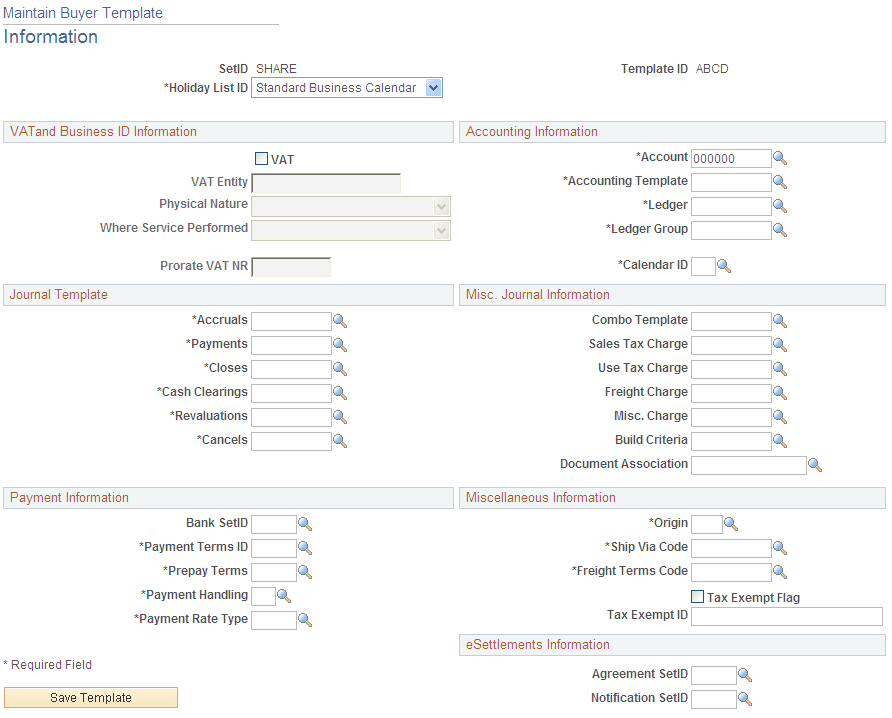
Use the Maintain Buyer Template - Information page (EM_BUYER_TEMPLATE) to establish all buyer creation defaults.
Navigation:
This example illustrates the fields and controls on the Maintain Buyer Template – Information page . You can find definitions for the fields and controls later on this page.
Note:
For the following fields, the system default is to not prorate the charges: Sales Tax Charge, Use Tax Charge, Freight Charge, and Misc. Charge (miscellaneous charge).
To prorate these, select then select the appropriate check boxes for the buyer.
| Field or Control | Description |
|---|---|
|
SetID |
Enter a SetID for this template. |
|
Template ID |
Enter an ID to define this template. |
|
Holiday List ID |
Select an ID to list the holidays for each buyer. |
VAT and Business ID Information
| Field or Control | Description |
|---|---|
|
VAT |
Select if the buyer operates in a VAT environment. |
|
VAT Entity |
Enter a value-added tax (VAT) reporting entity if you selected the VAT check box. |
|
Physical Nature |
Select Goods or Services to establish a default value that describes, for the majority of transactions, whether an object purchased is a physical good or a service. |
|
Where Service Performed |
Select Buyer's Location, Ship From Location, Ship To Location, or Supplier's Location to indicate the location at which a service is most often performed. |
|
Prorate VAT NR |
Enter a default miscellaneous charge code for the non-recoverable Input VAT, to determine how the system calculated, how non-recoverable VAT is accounted for, and whether it is treated as landed cost. Selection of a prorate charge code enables the non-recoverable VAT to be posted to the same set of ChartFields as specified for the associated expense, and enables the non-recoverable VAT to be treated as a landed cost. Selection of a non-prorate charge code allows the non-recoverable VAT to be posted to the ChartFields specified on the VAT accounting template for the associated VAT code. |
Accounting Information
| Field or Control | Description |
|---|---|
|
Account |
Enter a default account for processing. Note: For self-service invoices, the system overwrites this value if you establish values at lower levels of the PeopleSoft eSettlements default ChartField hierarchy. See Understanding Self-Service Invoice Entry and Management. |
|
Accounting Template |
Enter a template ID for voucher processing within PeopleSoft eSettlements. |
|
Ledger |
Enter a ledger to store the posted net activity for a set of ChartField values by accounting period and fiscal year. |
|
Ledger Group and Calendar ID |
Enter one of each because these are required for invoice entry and invoice management. |
Journal Template
A Journal Template is required for processing within PeopleSoft eSettlements.
| Field or Control | Description |
|---|---|
|
Accruals, Payments, Closes, Cash Clearings, Revaluations, and Cancels |
Enter a journal template to use for each category. |
Misc. Journal Information (miscellaneous journal information)
| Field or Control | Description |
|---|---|
|
Combo Template |
Select the delivered VCHREDIT record template for creation of a business unit. |
|
Sales Tax Charge, Use Tax Charge, Freight Charge, and Misc. Charge (miscellaneous charge) |
Enter the appropriate values. The system uses each of these portions of the total landed cost for non-merchandise charges, on purchase orders, receipts, and invoices. |
|
Build Criteria |
Enter a selection to enable editing both interfaced and online invoices/vouchers. |
|
Document Association |
Enter a value to determine how the system groups together receipts associated with a voucher line during the Matching Application Engine process (AP_MATCH). |
Payment Information
| Field or Control | Description |
|---|---|
|
Bank SetID |
Enter a SetID to store the banks for this buyer. |
|
Payment Terms ID, Prepay Terms, Payment Handling and Payment Rate Type |
Enter a terms ID, and values to further define the payment details. These are required for all transactions. |
Miscellaneous Information
| Field or Control | Description |
|---|---|
|
Origin |
Enter an origin to identify PeopleSoft eSettlements transactions in the system. This is used by both the invoice and purchase order interfaces. Note: The eSettlements Excel Upload and XML/cXML interfaces will populate the Voucher Origin as MPY if it is not specified in the Source transaction. This will require a valid Voucher Origin value of MPY to be defined in the system. |
|
Ship Via Code |
Enter a code to specify how a shipment from the supplier should be made. This defaults to incoming purchase orders. |
|
Freight Terms Code |
Select to specify at what point the title passes for shipment. This defaults to incoming purchase orders. |
|
Tax Exempt Flag |
Select if incoming purchase orders are tax exempt. |
|
Tax Exempt ID |
Enter an ID if you select the Tax Exempt Flag check box. |
eSettlements Information
| Field or Control | Description |
|---|---|
|
Agreement SetID |
Enter an ID to enable sharing of an agreement between buyers. You can also use it to ensure a specific agreement for each buyer. When the agreement is to be shared by several buyers, enter the value of the primary buyer ID for which all agreements will be created. The value you enter here populates the EM_01 record group. If you leave this field blank, the agreement is not shared and the system populates the record group EM_01 with the newly created buyer ID. |
|
Notification SetID |
Enter an ID to enable sharing of notification setup between buyers. The value you enter here populates the EM_03 record group. If you leave this field blank, the notification setup is not shared and the system populates the EM_03 record group with the newly created buyer ID. |
Template Values and Navigation
This table provides a list of buyer template configuration attributes and how to access their respective setup.
| Attribute | Navigation Path |
|---|---|
|
Holiday List ID |
|
|
VAT Entity |
|
|
Prorate VAT NR |
|
|
Journal Templates |
|
|
Origin |
|
|
Ship Via Code |
|
|
Freight Terms Code |
|
|
Tax Exempt Flag |
|
|
Tax Exempt ID |
|
|
Account |
|
|
Accounting Template |
|
|
Ledger |
|
|
Ledger Group |
|
|
Calendar ID |
|
|
Combo Template |
|
|
Sales Tax Charge |
|
|
Use Tax Charge |
|
|
Freight Charge |
|
|
Misc. Charge |
|
|
Agreement SetID |
|
|
Build Criteria |
|
|
Document Association |
|
|
Bank SetID |
|
|
Payment Terms ID |
Access the necessary Payment Terms pages. |
|
Prepay Terms |
Access the necessary Payment Terms pages. |
|
Payment Handling |
|
|
Payment Rate Type |
|