Defining PeopleSoft Expenses Processing Roles
To define processing roles for PeopleSoft Expenses, use the Expense Role (EX_ROLE_GBL) component.
Page Used to Define Expenses Processing Roles for PeopleSoft Expenses
| Page Name | Definition Name | Usage |
|---|---|---|
|
EX_ROLE |
Establish roles for employees depending on their positions in the company. |
Expenses Role Setup Page
Use the Expenses Role Setup page (EX_ROLE) to establish roles for employees depending on their positions in the company.
Navigation:
This example illustrates the fields and controls on the Expenses Role Setup page. You can find definitions for the fields and controls later on this page.
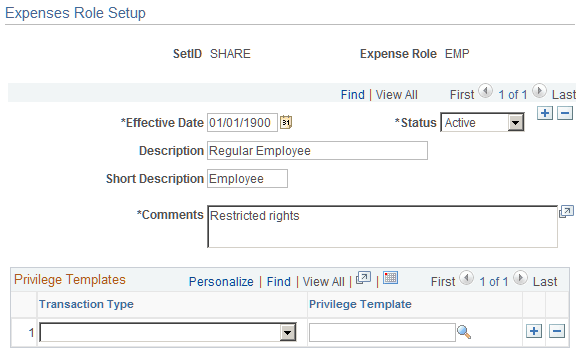
Use this page to associate an employee privilege template with a role for each transaction. If you do not define an employee privilege template for one or more transaction types, or for a role, the system uses the employee privilege template that is defined on the Business Unit Privileges page.
| Field or Control | Description |
|---|---|
|
Transaction Type |
Select a transaction type that is associated with the privilege template to associate it with the processing role. Applicable transaction types are Expense Report, Time Report, Cash Advances, and Travel Authorization. |
|
Privilege Template |
Select the predefined employee privilege template that is associated with the transaction type assigned to the expense role. |
Related Topics
- Understanding Accounting in PeopleSoft Expenses
- Understanding Employee Privilege Templates
- Understanding Header Level Default Accounting
- Understanding Expense Transaction Line Default Accounting
- Understanding Default Accounting Change Functionality
- Configuring Business Units for PeopleSoft Expenses
- Maintaining User Defaults