Mapping Accounting Information
To map accounting information, use the following components:
-
Adv Source - Payroll (EX_PY_MAP_AS.GBL).
-
Expense Type - Benchmark (EX_BMXPNTP_MAP_PNG.GBL).
-
Expense Type - Payroll (EX_PY_MAP_TBL.GBL).
Pages Used to Map Accounting Information
| Page Name | Definition Name | Usage |
|---|---|---|
|
EX_PY_MAP_AS |
Map cash advance sources to payroll earnings codes. |
|
|
EX_BMXPNTP_MAP_PNL |
Map benchmark expense types to expense types. |
|
|
EX_PY_MAP_TBL |
Map expense types to payroll earnings codes. |
Advance Source - Payroll Page
Use the Advance Source - Payroll page (EX_PY_MAP_AS) to map cash advance sources to payroll earnings codes.
Navigation:
This example illustrates the fields and controls on the Advance Source - Payroll page. You can find definitions for the fields and controls later on this page.

This table maps a cash advance source to an earnings code. When PeopleSoft Expenses publishes expense reimbursement data to Payroll for North America, this table prevents the payroll system from processing cash advances as payroll items.
| Mapping Table | Mapping From | Mapping To |
|---|---|---|
|
EX_PY_MAP_AS |
EX_ADV_SRC_TBL |
EARNINGS_TBL |
Expense Type - Benchmark Page
Use the Expense Type - Benchmark page (EX_BMXPNTP_MAP_PNL) to map benchmark expense types to expense types.
Navigation:
This example illustrates the fields and controls on the Expense Type - Benchmark page. You can find definitions for the fields and controls later on this page.
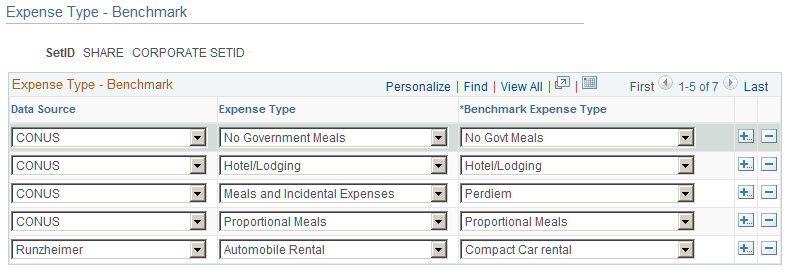
This table maps benchmark expenses in an external data file to an expense type in PeopleSoft Expenses. Mapping ensures that the system uses the correct associated benchmark amount when employees select an expense type for processing.
| Mapping Table | Mapping From | Mapping To |
|---|---|---|
|
EX_BMXPNSTP_MAP |
External data file |
EX_TYPES_TBL |
Expense Type - Payroll Page
Use the Expense Type - Payroll page (EX_PY_MAP_TBL) to map expense types to payroll earnings codes.
Navigation:
This example illustrates the fields and controls on the Expense Type - Payroll page. You can find definitions for the fields and controls later on this page.
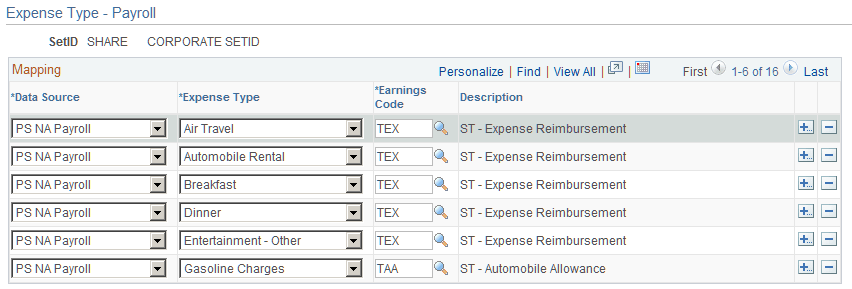
This table maps expense types to earnings codes. When PeopleSoft Expenses publishes expense reimbursement data to PeopleSoft Payroll for North America, this table identifies expenses to prevent the payroll system from processing them as payroll items.
| Mapping Table | Mapping from | Mapping to |
|---|---|---|
|
EX_PY_MAP_TBL |
EX_TYPES_TBL |
EARNINGS_TBL |