Mapping Expense Type
Pages Used to Map Expense Type
| Page Name | Definition Name | Usage |
|---|---|---|
|
EX_WIZARD_TBL |
Map Hotel Wizard types to expense types. |
|
|
EX_TXTMSG_MAP_PNL |
Map an expense type description to expense types. |
Expense Type - Wizard Type Page
Use the Expense Type - Wizard Type page (EX_WIZARD_TBL) to map Hotel Wizard types to expense types.
Navigation:
This example illustrates the fields and controls on the Expense Type - Wizard Type page. You can find definitions for the fields and controls later on this page.
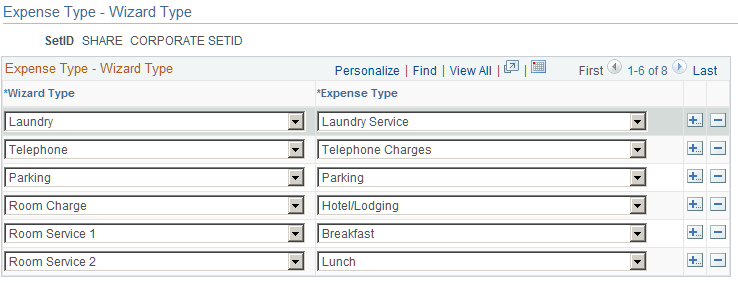
This table maps a wizard type (an expense type that comes with Hotel Wizard) to an expense type. When an employee selects a wizard type, PeopleSoft Expenses processes the charge using the associated expense type to ensure correct accounting.
| Mapping Table | Mapping from | Mapping to |
|---|---|---|
|
EX_WIZARD_TBL |
PSXLATITEM |
EX_TYPES_TBL |
Mapping of MISC on Expense Type - Wizard Type setup page will have no consequence, and all expense types will be listed while itemizing an expense line.
Expense Type - Text Message Page
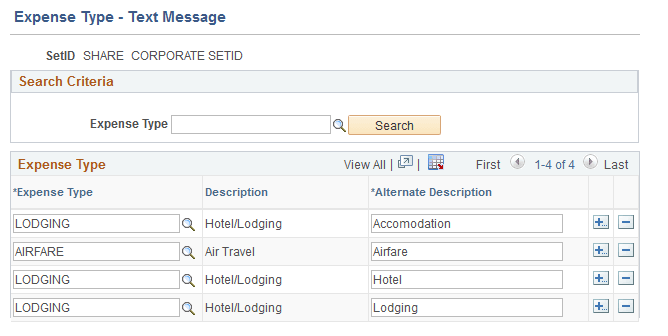
Use the Expense Type - Text Message page (EX_TXTMSG_MAP_PNL) to map an expense type description to expense types.
Navigation:
This example illustrates the fields and controls on the Expense Type - Text Message page.
| Field or Control | Description |
|---|---|
|
Search Criteria |
Select an expense type. The search criteria helps you retrieve those expense types that you entered in the search criteria. |
|
Expense Type |
Select an expense type to add an expense item. |
|
Description |
Displays the description as set up in the Expense Types 1 Page. For more information, see Setting Up Expense Types |
|
Alternate Description |
Enter a alternate description about the expense transaction. When PeopleSoft processes a text message received from Twilio, PeopleSoft uses the expense type definition. If no match found, the system will look at the alternate description mapping setup on this page. Alternate Description must be unique and it cannot be used for multiple expense types. However, you can define multiple keywords for the same expense type. For Example: LODGING expense type can have multiple keywords such as Hotel, Lodging, Accommodation etc. |
This table maps a expense type description received as a text message from Twilio to an expense type.
| Mapping Table | Mapping from | Mapping to |
|---|---|---|
|
EX_TXTMSG_MAP_PNL |
Text Message from Twilio |
EX_TYPES_TBL |