Mapping Corporate Card Data
To map corporate card data, use the following components:
-
Adv Source - Corporate Card (EX_ADV_SRC_MAP.GBL).
-
Expense Type - Corporate Card (EX_CCET_MAP_TBL.GBL).
-
Data Source - SetID (EX_SETID_MAP_PNG.GBL).
-
Payment Type - Corporate Card (EX_EM_MAP_TBL.GBL).
-
Merchant Category Group (EX_VIS_MCG_MAP.GBL).
Pages Used to Map Corporate Card Data
| Page Name | Definition Name | Usage |
|---|---|---|
|
EX_SETID_MAP_PNL |
Map external data sources to SetIDs. |
|
|
EX_EM_MAP_TBL |
Map credit card codes to payment types. |
|
|
EX_CCET_MAP_TBL |
Map a credit card supplier's merchant category group to expense types. |
|
|
EX_ADV_SRC_MAP |
Map credit card cash advance codes to cash advance sources. |
|
|
EX_VIS_MCG_MAP |
Map merchant category codes to merchant category groups. |
|
|
Expense Type - Enhanced Data American Express / Visa 4.4 Page |
EX_ENNC_DATA2 (American Express or Visa 4.4) EX_ENNC_DATA2 (all others) |
Map credit card enhanced data to expense types. |
Data Source - SetID Page
Use the Data Source - SetID page (EX_SETID_MAP_PNL) to map external data sources to SetIDs.
Navigation:
This example illustrates the fields and controls on the Data Source - SetID page. You can find definitions for the fields and controls later on this page.
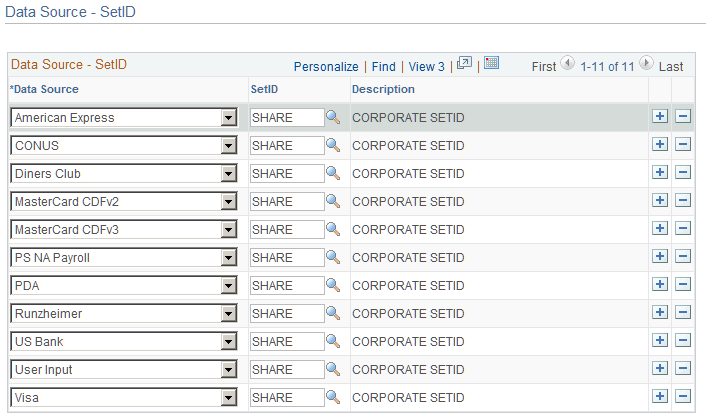
This table maps external data sources to SetIDs that are used in mapping other expenses information, such as benchmark expenses.
| Mapping Table | Mapping from | Mapping to |
|---|---|---|
|
EX_BNCHMRKSETID |
External file |
SETID_TBL |
Payment Type - Corporate Card Page
Use the Payment Type - Corporate Card page (EX_EM_MAP_TBL) to select corporate card issuer and map corresponding credit card codes to payment types.
Navigation:
This example illustrates the fields and controls on the Payment Type - Corporate Card page.

Select the data source, SetID for the corporate card issuer, and corporate card issuer for making a payment. Based on this information, the credit card code maps to the payment type.
Note:
The SetID Card Issuer column only appears when the Credit Card Multiple Vendor option is selected on the Application Fundamentals: Installation Options - Expenses Page.
| Mapping Table | Mapping from | Mapping to |
|---|---|---|
|
EX_EM_MAP_TBL |
External data files |
EX_EXP_MTHD_TBL |
Expense Type - Corporate Card Page
Use the Expense Type - Corporate Card page (EX_CCET_MAP_TBL) to map a credit card supplier's merchant category group to expense types.
Navigation:
This example illustrates the fields and controls on the Expense Type - Corporate Card page. You can find definitions for the fields and controls later on this page.
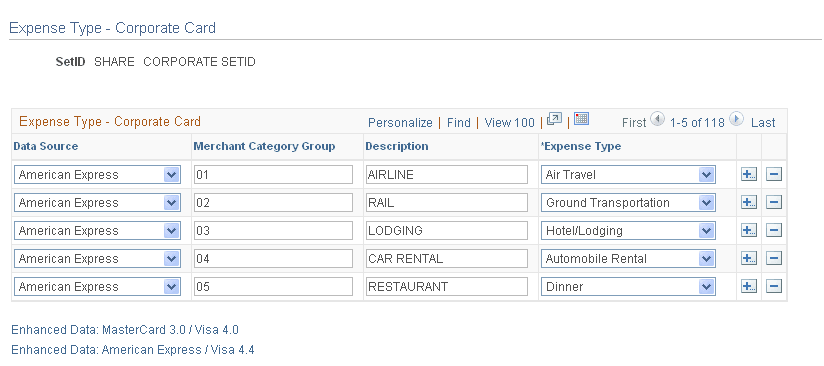
This table maps the credit card supplier's merchant category group to an expense type in PeopleSoft Expenses. Mapping enables credit card feeds to populate expense lines automatically when an employee selects credit card transactions to process an expense report.
| Field or Control | Description |
|---|---|
|
Enhanced Data: MasterCard #.#/Visa #.# |
Click to access the Expense Type - Enhanced Data page for Visa and Master Card. The “#” sign indicates the release in which the PeopleSoft system integrates with the credit card supplier. |
|
Enhanced Data: American Express / Visa #.# |
Click to access the Expense Type – Enhanced Data page for American Express and Visa. The “#” sign indicates the release in which the PeopleSoft system integrates with the credit card supplier. |
| Mapping Table | Mapping from | Mapping to |
|---|---|---|
|
EX_CCET_MAP_TBL |
Credit card supplier files |
EX_TYPES_TBL |
Advance Source - Corporate Card Page
Use the Advance Source - Corporate Card page (EX_ADV_SRC_MAP) to map credit card cash advance codes to cash advance sources.
Navigation:
This example illustrates the fields and controls on the Advance Source - Corporate Card page. You can find definitions for the fields and controls later on this page.

This table maps the credit card supplier's industry cash advance code to a cash advance source in PeopleSoft Expenses. Because cash advance line items require an advance source, mapping enables automatic population of cash advance lines by credit card feeds when employees process credit card transactions.
| Mapping Table | Mapping from | Mapping to |
|---|---|---|
|
EX_ADV_MAP_TBL |
Credit card supplier file |
EX_ADV_SRC_TBL |
Merchant Category Group Page
Use the Merchant Category Group page (EX_VIS_MCG_MAP) to map merchant category codes to merchant category groups.
Navigation:
This example illustrates the fields and controls on the Merchant Category Group page. You can find definitions for the fields and controls later on this page.
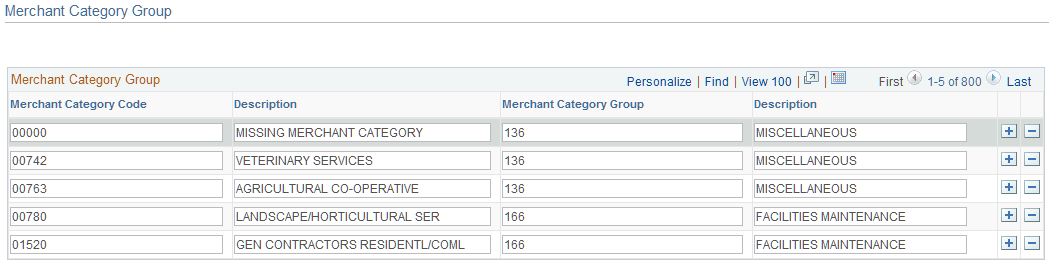
This table maps standard industry merchant category codes to merchant category groups. The mapping table works with the Expense Type - Corporate Card map to associate credit card transactions with expense types through the Merchant Category Group field. This mapping is used by Visa International, MasterCard, and US Bank.
| Mapping Table | Mapping from | Mapping to |
|---|---|---|
|
EX_VIS_MCG_MAP |
Standard industry codes provided by the supplier |
EX_CCET_MAP_TBL |
Related Topics
Expense Type - Enhanced Data American Express / Visa 4.4 Page
Use the Expense Type - Enhanced Data American Express / Visa 4.4 page (EX_ENHC_DATA2) to map credit card enhanced data to expense types.
Navigation:
Click the Enhanced Data: Supplier link on the Expense Type - Corporate Card page.
This example illustrates the fields and controls on the Expense Type - Enhanced Data American Express / Visa 4.4 page. You can find definitions for the fields and controls later on this page.
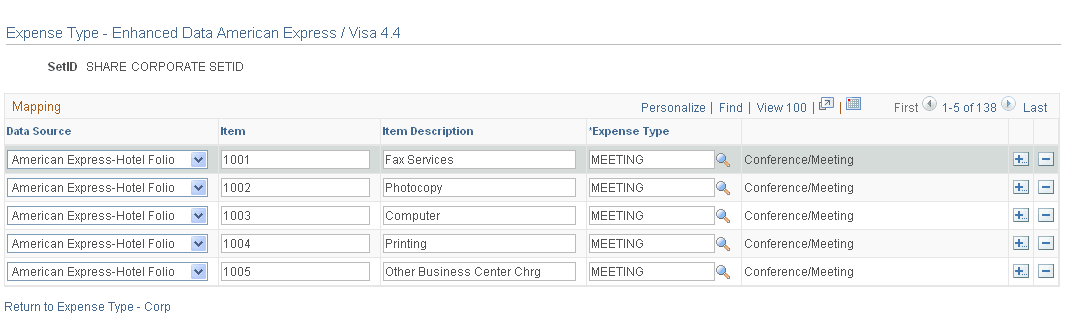
This example illustrates the fields and controls on the Expense Type - Enhanced Data MasterCard 3.0 / Visa 4.0 page.
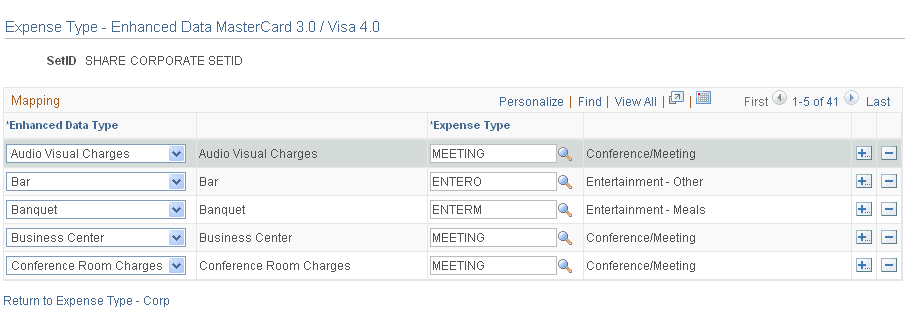
If you are using enhanced credit card data for hotel transactions, you must map the fields that are available in the detail and summary records to an expense type.
This table maps the credit card supplier's enhanced data to an expense type in PeopleSoft Expenses. Mapping enables credit card feeds to populate expense lines when an employee selects credit card transactions to process an expense report.
Note:
If the setup of enhanced data expense type is not correct or is incomplete, the expense type of the enhanced data row that is created is updated with the expense type from the original financial transaction. For example, if there is not an expense type set up for MiniBar, the enhanced data rows are assigned an expense type of Lodging, which is the expense type associated with the original financial transaction.