Viewing Expense Report Accounting Entries
Pages Used to View Expense Report Accounting Entries
| Page Name | Definition Name | Usage |
|---|---|---|
|
Expense Report Acctg Entries Page (Expense report accounting entries page) |
EX_ACCTG_LN_SHEET |
View an employee's expense report accounting lines. |
|
Journal Lines Page |
JOURNAL_LN_FS |
Select a transaction line to view additional general ledger journal information about an expense report. To access this page, click the View Related Links button on the Expense Report Acctg Entries page. |
|
EX_ACCTG_GL_DRLDN |
View expense report journal lines recorded in the general ledger. |
Expense Report Acctg Entries Page
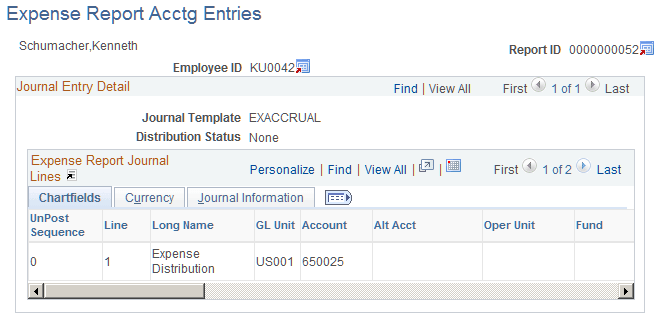
Use the Expense Report Acctg Entries page (EX_ACCTG_LN_SHEET) to view an employee's expense report accounting lines.
Navigation:
This example illustrates the fields and controls on the Expense Report Acctg Entries page (partial). You can find definitions for the fields and controls later on this page.
| Field or Control | Description |
|---|---|
|
|
Click the Employee Profile icon to view the Employee Profile - Employee Data page. |
|
|
Click the Expense Report Detail icon to access the Expense Report Detail page. |
|
|
Click the View Related Links icon to access the Journal Lines page where you select a line to view additional general ledger journal information about the expense report. |


Journal entries Page
Use the Journal entries page (EX_ACCTG_GL_DRLDN) to view expense report journal lines recorded in the general ledger.
Navigation:
-
-
-
-
Click the GL Journal Line Number button on the Journal Lines page.
This example illustrates the fields and controls on the Journal entries page (1 of 2). You can find definitions for the fields and controls later on this page.
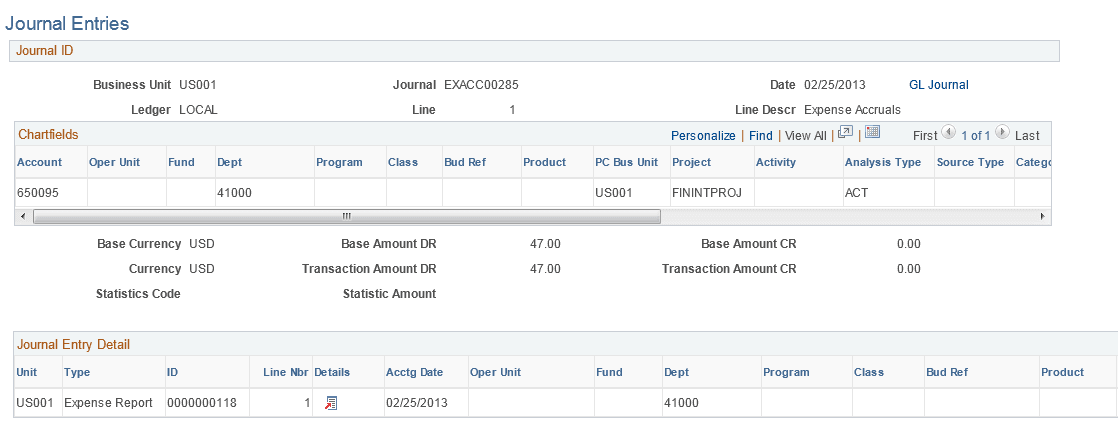
This example illustrates the fields and controls on the Journal entries page (2 of 2). You can find definitions for the fields and controls later on this page.

| Field or Control | Description |
|---|---|
|
GL Journal |
Click to access the Journal Lines page, where you can view all journal lines for the Journal ID. Journal lines are summarized according to the configuration of your journal generator template for PeopleSoft Expenses. |
Journal Entry Detail
| Field or Control | Description |
|---|---|
|
|
Click the View Related Links icon to access links to additional pages:
|
