Setting Up Portal Pack Default Administration
This topic provides an overview and discusses how to set up portal pack default administration.
Page Used to Set Up Portal Pack Default Administration
| Page Name | Definition Name | Usage |
|---|---|---|
|
Portal Pack Default Administration - Real Estate Management Page |
RE_PP_DEF_ADMIN |
Define user defaults for each pagelet. |
Understanding Portal Pack Default Administration
The portal pack default administration page enables you to establish default filters for your pagelets. When setting up the PeopleSoft Lease Administration system, you need to first identify default filters from an administrative level. The administrative settings provide the default personalization values that individual users inherit if they do not establish their own values. The administration values can only be established at the Administration level. After the administrative default values are defined, each user can establish their own defaults through the Portal Pack Default Administration page.
See Application Fundamentals: Understanding User Preferences.
Portal Pack Default Administration - Real Estate Management Page
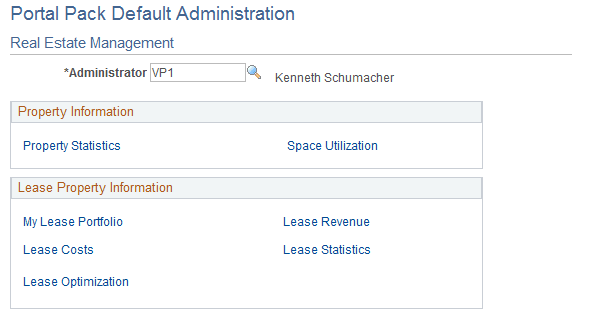
Use the Portal Pack Default Administration - Real Estate Management page (RE_PP_DEF_ADMIN) to define user defaults for each pagelet.
Navigation:
This example illustrates the fields and controls on the Portal Pack Default Administration - Real Estate Management page. You can find definitions for the fields and controls later on this page.
Property Information
Click the links to access the personalization pages used to define pagelet default filters.
Lease Property Information
Click the links to access the personalization pages used to define pagelet default filters.