Viewing Top Five Issues
This topic discusses how to view the top five issues and personalize the Top 5 Issues pagelet.
Pages Used to View Top Five Issues
| Page Name | Definition Name | Usage |
|---|---|---|
|
PGM_PE_TISU (wide) PGM_PE_TISU_N (narrow) |
View up to five projects or programs that have the highest number of open high priority issues. |
|
|
PGM_PE_TISU_PRS |
Define default display information for the Top 5 Issues pagelet. |
Top 5 Issues Pagelet
Use the Top 5 Issues pagelet (PGM_PE_TISU [wide] and PGM_PE_TISU_N [narrow]) to view up to five projects or programs that have the highest number of open high priority issues.
Navigation:
Click the Personalize Content link on the PeopleSoft Home page.
Select Top 5 Issues.
You select the program or project to monitor, and the Top 5 Issues pagelet displays the top five issues that it encounters in the specific project or program. The system determines the top five issues by first selecting the issues with the highest priority from the options of high, medium, and low. Then the system selects the oldest issues, according to the Issue Entered Date. Only issues without resolutions appear.
Click the issue ID link to access the Issue page in PeopleSoft Program Management.
Personalize Top 5 Issues Page
Use the Personalize Top 5 Issues page (PGM_PE_TISU_PRS) to define default display information for the Top 5 Issues pagelet.
Navigation:
-
Click the Top 5 Issues link on the ESA Portal Pack Pagelet Default Administration page.
-
Click the Customize Top 5 Issues icon on the Top 5 Issues pagelet.
This example illustrates the fields and controls on the Personalize Top 5 Issues page.
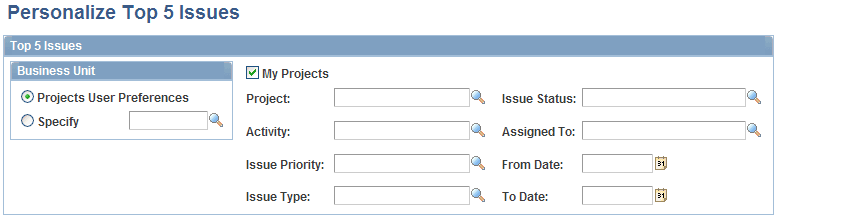
Specify parameters to filter the projects or programs and issues that you want to appear on the Top 5 Issues pagelet.
Click Restore Defaults to restore the default selection criteria that the pagelet administrator establishes on the ESA Portal Pack Pagelet Default Administration page. The Restore Defaults button appears if you access this page by clicking the Customize Top 5 Issues link on the Top 5 Issues pagelet.