Viewing Unbilled Balances to Projects Expiring
This topic discusses how to view unbilled balances to projects expiring and personalize the Expiring Projects pagelet.
Pages Used to View Unbilled Balances
| Page Name | Definition Name | Usage |
|---|---|---|
|
GL_PE_07 |
View a list of the top five projects with unbilled amounts, and project expiration dates. Sort by most unbilled amounts or by earliest expiration date. |
|
|
GL_PE_07_PRS |
Define default display information for the Expiring Projects pagelet. |
Expiring Projects Pagelet
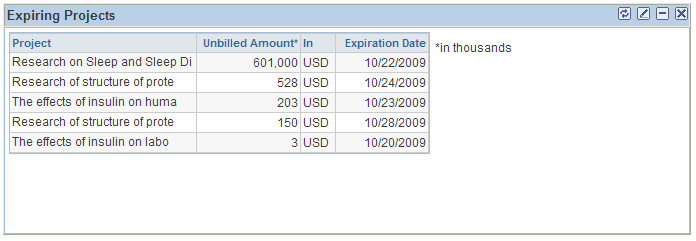
Use the Expiring Projects pagelet (GL_PE_07) to view a list of the top five projects with unbilled amounts, and project expiration dates.
Sort by most unbilled amounts or by earliest expiration date.
Navigation:
Click the Personalize Content link on the PeopleSoft homepage.
Select Expiring Projects.
This example illustrates the fields and controls on the Expiring Projects pagelet. You can find definitions for the fields and controls later on this page.
| Field or Control | Description |
|---|---|
|
Unbilled Amount |
The amount of the balance that has not been billed. |
|
Expiration Date |
The date a project ends. This date was entered when the project was added to the system. |
Unbilled Balances to Projects Expiring Personalization Page
Use the Unbilled Balances to Projects Expiring Personalization page (GL_PE_07_PRS) to define default display information for the Expiring Projects pagelet.
Navigation:
Click the Customize icon on the Expiring Projects pagelet.
This example illustrates the fields and controls on the Unbilled Balances to Projects Expiring Personalization page. You can find definitions for the fields and controls later on this page.
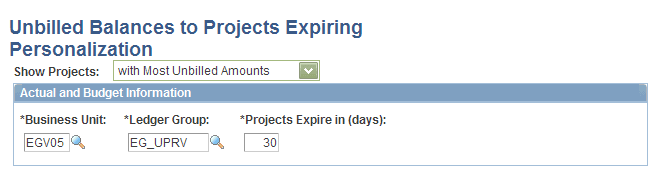
Select to show the top five projects with the most unbilled amounts or those that are expiring the earliest.
| Field or Control | Description |
|---|---|
|
Ledger Group |
The Expiring Projects pagelet retrieves data only from Commitment Control ledgers. Select a specific Commitment Control ledger group. |
|
Projects Expire in (days) |
Enter the number of days before the project expires. The system uses this information to select only projects that expire within the number of specified days. |