Search Audit Logs Page
Use the Search Audit Logs page (FS_AUDITLOG_SEARCH) to search for journal audit logs.
Navigation:
This example illustrates the fields and controls on the Search Audit Logs page. You can find definitions for the fields and controls later on this page.
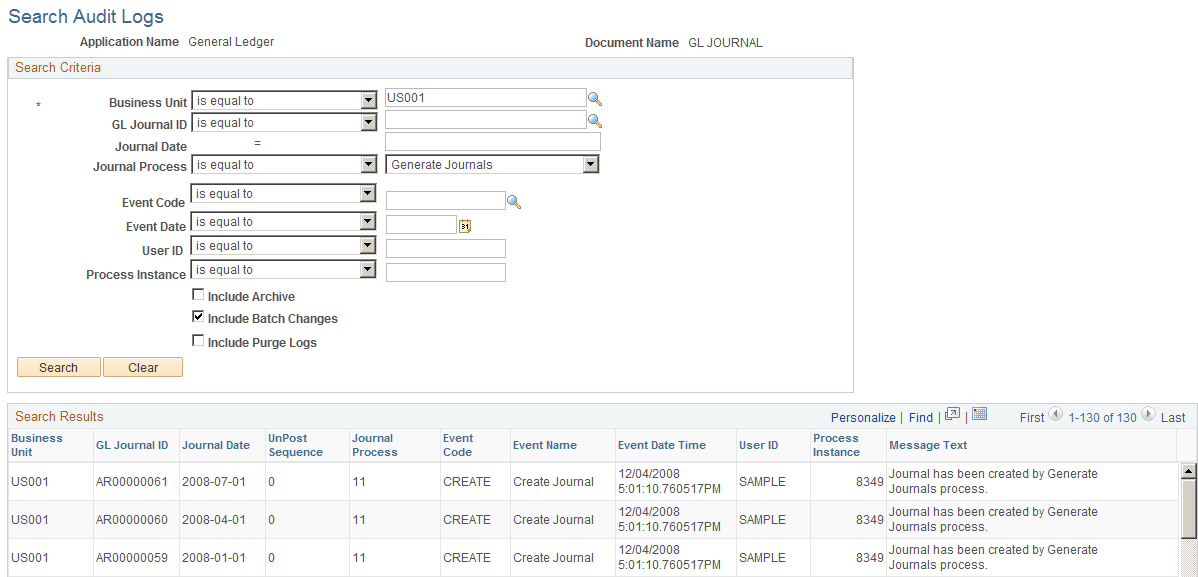
The Search Audit Logs page accesses journal events that are populated in the GL Journal Audit record (GL_AUD_JRNL) if the corresponding events are enabled for audit logging. Enter your selection criteria and click the Search button to retrieve the requested audit information in the Search Results grid. This is the same page that is accessed when you click the View Audit Logs link from various journal pages, such as the Journal Entry - Lines page, for example. Other General Ledger pages that provide links to the Search Audit Logs page include the Mark Journals for Posting page, Mark Journals for Unposting page, and Journal Suspense Correction page.
| Field or Control | Description |
|---|---|
|
Include Archive |
Select to include archived logs in your search results. |
|
Include Batch Changes |
Some logs are created by batch processes. Select to track modifications to documents. However, tracking down a nightly scheduled process might not be very relevant. So, this option allows you to include or exclude the logs created in batch processes. |
|
Include Purge Logs |
Select to include deleted audit logs (that you purged using the Purge Audit Logs page) in the search display. |