Setting Up Expense Amortization
Pages Used to Set Up Expense Amortization
| Page Name | Definition Name | Usage |
|---|---|---|
|
AMORT_TYPE |
Define the various types of amortization by SetID. |
|
|
AMORT_TEMPLATE |
Associate ChartFields with each of the different types of amortization. |
|
|
SUMMARY_CALENDAR |
Define period ranges for each summary calendar period for a SetID. |
|
|
Application Fundamentals: Ledgers For A Unit - Definition Page |
BUSINESS_UNIT_LED1 |
Identify the detail ledgers, ledger groups, and calendars used by the business unit and identify specific characteristics for each ledger. |
|
SOURCE1 |
Define an amortization journal source. |
|
|
DOC_TYPE |
Define an amortization document type. |
Amortization Type Page
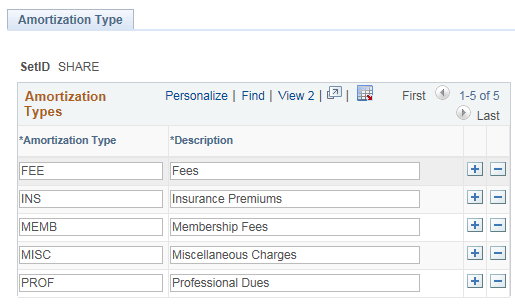
Use the Amortization Type page (AMORT_TYPE) to define the different types of amortization for a SetID.
Navigation:
This example illustrates the fields and controls on the Amortization Type page.
Amortization Template Page
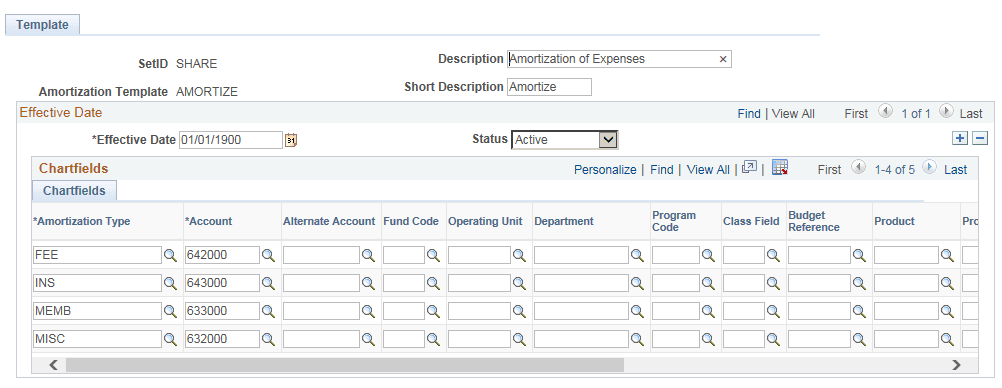
Use the Amortization Template page (AMORT_TEMPLATE) to Associate ChartFields with each of the different types of amortization.
Navigation:
This example illustrates the fields and controls on the Amortization Template page. You can find definitions for the fields and controls later on this page.
| Field or Control | Description |
|---|---|
|
SetID |
Select a SetID for which you want to associate the ChartFields. |
|
Amortization Type |
Select a type of amortization to associate with the SetID. |
|
Account |
Select an expense account that will be assigned as a default for the amortization type. |
Summary Calendar Page
Define summary calendars using the Summary Calendar component (SUMMARY_CALENDAR).
Two types of summary calendars are supported for amortizing: Quarterly and Annual.
For defining Summary Calendars, access the Summary Calendar page. For details on defining Summary Calendars, see Application Fundamentals: Defining Summary Calendars
Journal Source - Definition Page
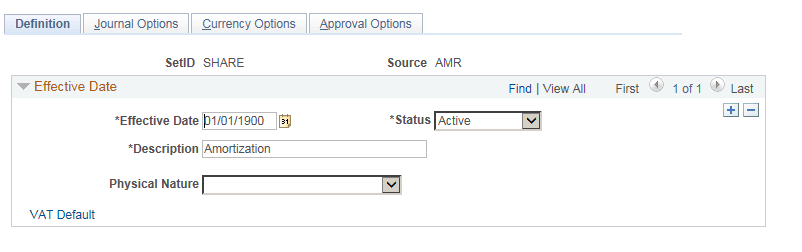
Use the Journal Source - Definition page (SOURCE1) to define a journal source.
Navigation:
This example illustrates the fields and controls on the Journal Source - Definition page.
For a detailed description of Common Journal Definitions, see Application Fundamentals: Defining Common Journal Definitions
Document Type Page
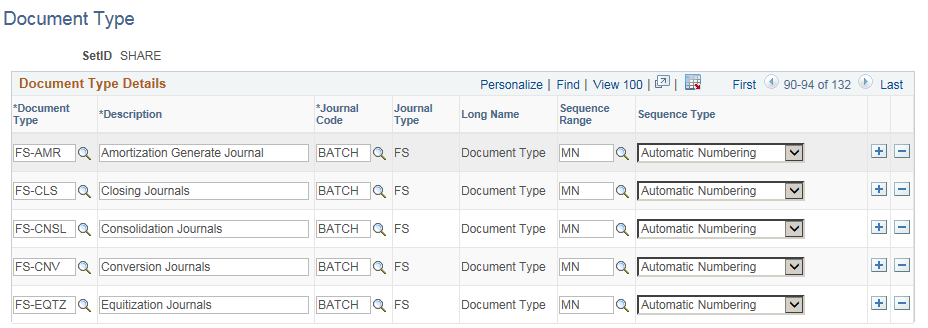
Use the Document Type page (DOC_TYPE) to define your amortization document type.
Navigation:
This example illustrates the fields and controls on the Document Type page .
For a detailed description on Document Types, see PeopleSoft Payables: Defining and Assigning Document Types