Using the Generic Process Initiation Service
PeopleSoft Financials provides a generic process initiation web service, PROCESS_INITIATION, which enables third-party applications to launch PeopleSoft processes for any Financial product such as PeopleSoft General Ledger, Payables, Receivables, Billing, or Asset Management. The following diagram represents the integration process flow:
Process Initiation Asynchronous Web Service Process Flow
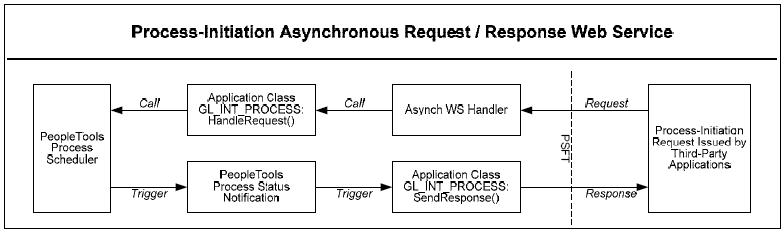
PeopleSoft delivers the following as part of the generic process initiation integration between third-party applications and PeopleSoft Financials (PeopleTools 8.51):
-
Generic process initiation Asynchronous Request/Response Web Service, PROCESS_INITIATION, which can be invoked to initiate any PeopleSoft process.
-
The PROCESS_INITIATION web service utilizes PeopleTools 8.51 Process Status Notification Service, PRCS_STATUS_NOTIFY, to retrieve the process status and deliver the response to the third-party application with notification of process completion. The response xml includes the URL link(s) to the location of any report files that are created by the process.
Note:
PeopleSoft does not deliver routings for this Process Status Notification Service. A Local-to-Local Routing for its Service Operation, PRCS_STATUS_OPER, must be generated manually.
-
Request and Response messages with Schema:
-
Request Message, PROCESS_SUBMIT_REQ.V1 with Schema
-
Response Message, PROCESS_SUBMIT_RES.V1 with Schema
-
Note:
The objects related to this service are delivered as inactive and must be activated in order to use this integration.
See Activating Objects for the PeopleSoft Integration for Third-Party Applications.
Request Message
The following graphic represents the schema for the request message, PROCESS_SUBMIT_REQ.V1:
Request Message Schema for PROCESS_SUBMIT_REQ.V1 Message
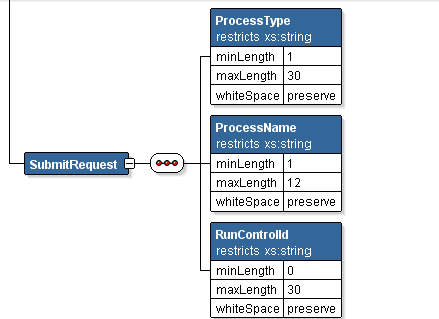
The following three parameters are required in the request xml:
-
Process Type of the defined PeopleSoft process (maximum length = 30 characters)
-
Process Name of the defined PeopleSoft process (maximum length = 12 characters)
-
Run Control ID (must be predefined for that process)
See Examples of PeopleSoft Processes Initiated Using the Generic Process Initiation Service.
Note:
You can review the schema content by accessing PeopleTools, Integration Broker, Integration Setup, Messages, Schema.
Response Message
The Response Message, PROCESS_SUBMIT_RES.V1, returns:
-
Original three request parameters.
-
Process description.
-
Run status (failure or success).
-
Message (from message log).
-
Run Status Code (Process Run Status value, not the meaningful translation value).
-
Process instance and Content ID.
-
Report URL (link to Report Manager to view resulting report), if applicable.
Note:
The Run Status Code, Process Instance, Content ID, and Report URL are only included if they have values.