Fulfillment Queue Location / Lot / Serial Page
Use the Fulfillment Queue Location / Lot / Serial page (IN_FW_CART_LLS) to review demand location information for a specific request detail row.
Navigation:
Select the Location / Lot / Serial link on the Location / Lot / Serial tab of the Fulfillment Queue page.
This example illustrates the fields and controls on the The Lot/Serial tab of the Fulfillment Queue Location / Lot / Serial page. You can find definitions for the fields and controls later on this page.
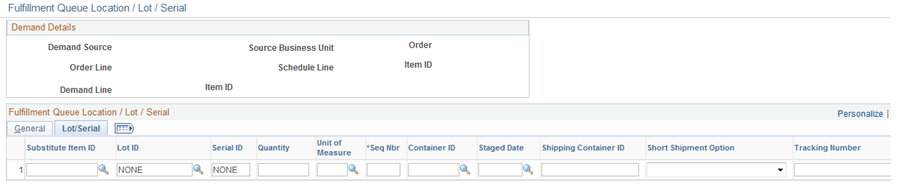
When shipping from an unfulfilled or releasable state, you can enter the exact picking location, lot ID, stage date, serial ID, or ship serial ID. You can also exclude a specific picking location, lot ID, and serial ID when shipping from a confirmed state or change the pick or ship quantity and UOM.
This page contains the same fields as the Location / Lot / Serial page above, but also includes the following additional fields:
| Field or Control | Description |
|---|---|
|
Substitute Item ID |
Enter a substitute item ID if the original item is defined for substitutes. Item substitution is only allowed for the first LLS row. For subsequent rows of the same demand line, the substitute item is display-only. |
|
Seq Nbr |
Enter the sequence number. The sequence number is a unique identifier for rows with the LLS segment for each detail segment. |