Location / Lot / Serial Page
Use the Location / Lot / Serial page (IN_FW_DEMANDLOC) to review demand location information for a specific request detail row.
Navigation:
Select the Location / Lot / Serial link on the Demand Lines page.
This example illustrates the fields and controls on the Location/Lot/Serial page from the Demand Lines page. You can find definitions for the fields and controls later on this page.
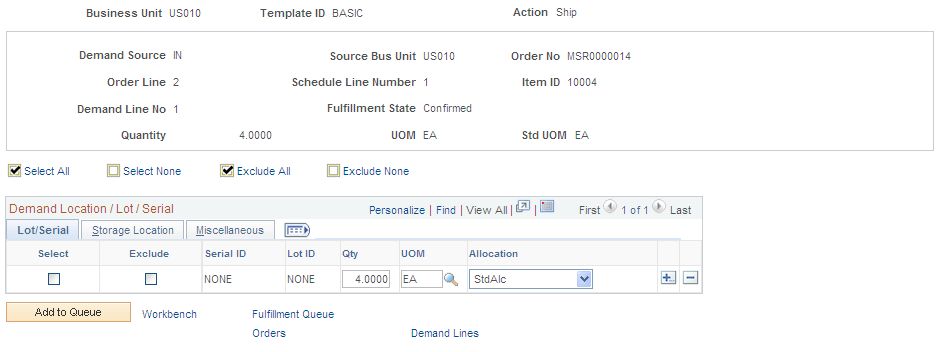
When shipping from an unfulfilled or releasable state, you can enter the exact picking location, lot ID, stage date, serial ID, or ship serial ID. You can also exclude a specific picking location, lot ID, and serial ID when shipping from a confirmed state or change the pick or ship quantity and UOM.
Review or change demand location information in this request detail row.
| Field or Control | Description |
|---|---|
|
Kit ID |
Displays the product kit ID if this demand line contains a kit component. This value is also a link to the Kit Display page. See Kit Display Page. |
Lot / Serial tab
| Field or Control | Description |
|---|---|
|
Serial ID |
Review or enter a serial ID for this request detail row or demand line. If the item is defined as a ship serial controlled item then enter the ship serial ID here. |
|
Qty |
Review or change the picking or shipping quantity for this request detail row. |
|
UOM (unit of measure) |
Review or change the picking or shipping UOM for this request detail row. |
|
Allocation |
Displays the type of allocation on this demand line. The options are:
|
Storage Location tab
| Field or Control | Description |
|---|---|
|
Excluded |
Select to exclude a specific picking location, lot ID, or serial ID from this request detail row. This check box is available only when shipping from a confirmed state. |
|
Area, Lev 1, Lev 2, Lev 3, and Lev 4 |
Review or enter a specific picking location for this request detail row. |
Miscellaneous tab
| Field or Control | Description |
|---|---|
|
Cntr ID and Staged Dt |
Review or enter an internal container ID or staged date for this demand line. |
|
Shipping Container ID |
Review or enter a shipping container ID for this demand line. |
|
Short Ship Opt |
Select an option for short shipping this demand line. Options are:
|
|
Tracking Number |
Review or enter a tracking number assigned to this shipment. |