Item Balance by Location Page
Use the Item Balance by Location page (LOC_BAL_INQ_INV) to display the quantity of an item by storage location in a PeopleSoft Inventory business unit.
Navigation:
This example illustrates the fields and controls on the Item Balance by Location page. You can find definitions for the fields and controls later on this page.
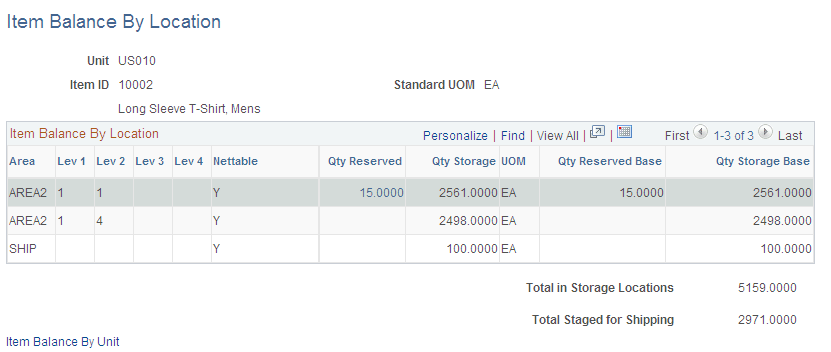
This page displays item quantities in a business unit and within the material storage locations.
| Field or Control | Description |
|---|---|
|
Area, Lev 1, Lev 2, Lev 3, and Lev 4 |
Displays the material storage location where the stock is located. |
|
Nettable |
Displays whether the material storage location is nettable or non-nettable. Non-nettable locations are not available for reservations and are not released to picking by the Order Release process. |
|
Qty Reserved |
Displays the quantity at the material storage location that has been allocated to fulfill orders, such as material stock requests, sales orders, and work orders. Click the quantity link to access the Allocated Items by Location page where you can view the quantity that has been allocated to specific orders as well as pegged quantities and item attributes. |
|
Qty Storage |
Displays the item quantity in this material storage location that is not allocated. This includes available quantity plus reserved quantity. |
|
Qty Reserved Base |
Displays the allocated quantity in the standard (base) unit of measure. |
|
Qty Storage Base |
Displays the item storage quantity in the standard (base) unit of measure. |
|
Total in Storage Locations |
Displays the total of the Qty Storage column. |
|
Item Balance By Unit |
Accesses the Item Balance by Unit page, where you can view quantity balance information at the business-unit level. |
Note:
You can confirm the value for the Quantity On Hand field that appears on the Item Balance by Unit page by adding the item quantities in the Qty Storage column, the Qty Reserved column, and the Total Staged for Shipping field.