Item Balance by Unit Page
Use the Item Balance by Unit page (INV_BU_QTY_INQ) to display item balances in a specific PeopleSoft Inventory business unit.
Navigation:
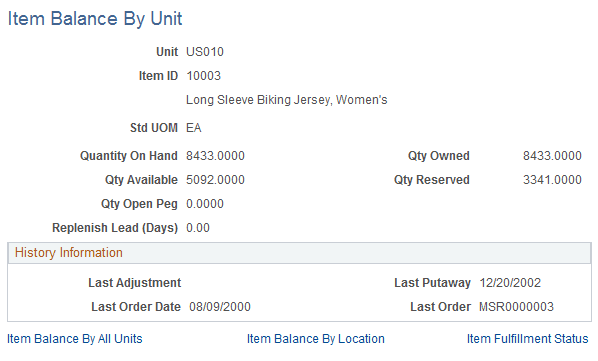
This example illustrates the fields and controls on the Item Balance by Unit page. You can find definitions for the fields and controls later on this page.
| Field or Control | Description |
|---|---|
|
Quantity On Hand |
Displays the entire item quantity for this business unit, including, quantity that has been soft-reserved, hard-allocated, available stock, and staged for shipping. |
|
Qty Available |
Displays the quantity available in this business unit to fulfill demand. This is the total quantity on hand less the quantity reserved and allocated. |
|
Qty Reserved |
Displays the item quantity that is reserved and allocated for this business unit. |
|
Qty Open Peg |
Displays the total peg quantity less any completions for this business unit and item ID combination. A completion is a peg quantity that has been received and putaway into the Inventory business unit. The open peq quantity in this field displays the amount of incoming stock that is currently pegged to fulfill existing demand. See PeopleSoft Supply Chain Management Common Information: Understanding Pegging. |
|
History Information |
The dates of the last adjustment, last putaway, and last order that affected the quantity balance. |
|
Item Balance By All Units |
Access quantity balance information across all business units in which the item is defined. |
|
Item Balance By Location |
Access quantity balance information across storage locations in a specific business unit. |
|
Item Fulfillment Status |
Access the fulfillment status of orders for the selected item. |