Par Location Replenishment Methods
PeopleSoft Inventory offers four par location replenishment methods: stock, stockless, nonstock, and not replenished. The method that you use depends upon whether you replenish items from inventory, from PeopleSoft Purchasing, or from other par locations. The Create Par Replenishment Requests process replenishes each item according to the par replenishment option that you specified in the Define Par Location component.
The replenishment method determines how you handle general ledger accounting for par inventory. Stock replenishment transactions post to the general ledger business unit that is associated with the inventory business unit, while stockless and nonstock replenishment transactions post to the general ledger business unit that is associated with the purchasing business unit.
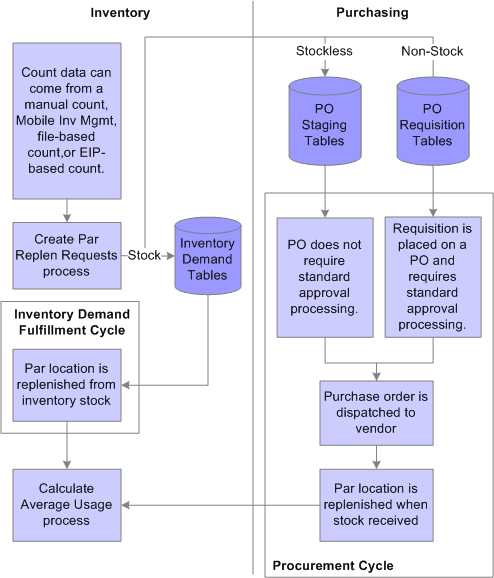
The following diagram illustrates the replenishment methods that you can use to restock par locations. Once a current count of the par locations have been completed, the Create Par Replenishment Requests process creates a material stock request for stock items, a purchase order for stockless items, and a requisition for nonstock items. The material stock request flows through PeopleSoft Inventory demand fulfillment. The purchase order and requisition flow through the PeopleSoft Purchasing system. The requisition created for nonstock items will require approval before a purchase order is created.
Stock Replenishment
Use stock replenishment for par location items that are part of your inventory stock and are replenished from a PeopleSoft Inventory business unit. When item quantity falls below the optimal level, the Create Par Replenishment Requests process creates a material stock request, subtracting any open on-order demand quantity from the material stock request quantity. The process does not evaluate whether sufficient stock exists to fulfill the replenishment request.
Stockless and Nonstock Replenishment
If the installation includes PeopleSoft Purchasing, you can use stockless or nonstock replenishment processing for par location items that are ordered directly through PeopleSoft Purchasing. Stockless and nonstock items might be part of the inventory stock.
The supplier supplies stockless items directly to the par location according to a previously established agreement. When item quantity falls below the optimal level, the Create Par Replenishment Requests process stages a purchase order that requires no approval processing. The process also cancels any backordered quantity that the supplier cannot supply with the first receipt; it does not, however, evaluate whether quantity exists on open purchase orders.
Nonstock items require standard purchase order approval processing. When item quantity falls below the optimal level, the Create Par Replenishment Requests process generates a requisition in PeopleSoft Purchasing. The system then subtracts from the requisition quantity any open on-order quantity that exists on a requisition or purchase order or in receiving.
Not Replenished
Use the Not Replenished option for items stored in par locations that are actual points of use for stock. Rather than running the Create Par Replenishment Requests process for such items, you restock the locations manually using items in replenished par locations. This option is useful when you want to conduct inventory counts in areas that are not true storage locations. For example, you might create a not-replenished par location for use in an operating room to ensure that all of the required instruments and surgical supplies are in place for a given surgical schedule. The system does not generate material stock requests from counts of not-replenished items.