Pre-Allocated Items
An allocation occurs when an item quantity in a specific material storage location (MSL) within the inventory business unit has been reserved for a particular demand line. Allocation usually occurs when the Order Release process is run, moving the demand line from the Releasable fulfillment state to the Released state. However, allocations can take place earlier in the demand fulfillment cycle; this is called pre-allocation.
PeopleSoft Inventory defines the following types of allocations:
-
Standard Allocation: Refers to an allocation that is created within the picking fulfillment step; that is, when the demand line is moved to the Released fulfillment state.
-
Pre-Allocation: Refers to an allocation to a MSL that is created before the picking fulfillment step; that is, while the demand line is in the Unfulfilled or Releasable state. Pre-allocations can occur when pegged stock is putaway in the inventory business unit or when you pre-allocate stock to a demand line.
-
Lot-Allocation: Refers to allocating a specific lot ID to fulfill a lot-controlled item on a demand line. This is a type of pre-allocation since it takes place when the demand line is in the Unfulfilled or Releasable fulfillment state. It differs from other pre-allocations in that the demand line is allocated to a particular lot ID.
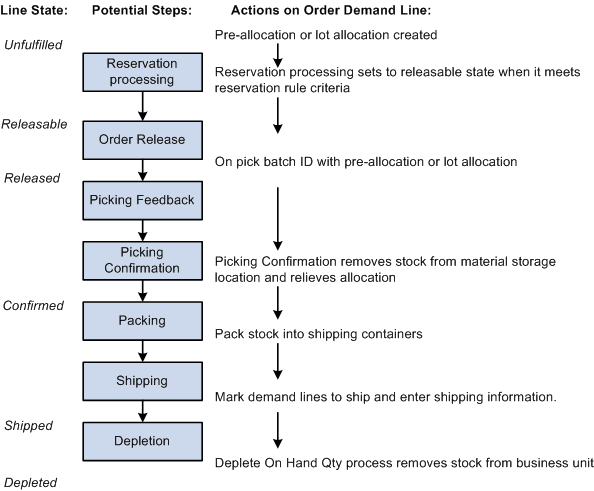
The following diagram illustrates the possible fulfillment steps that you might use for a pre-allocated or lot-allocated demand line:
Pre-Allocation
A pre-allocation occurs when a demand line is allocated to inventory stock while the demand line is still in the Unfulfilled or Releasable fulfillment state. A pre-allocation can be created by:
-
The pegging feature.
-
The Allocation Workbench.
-
The Create/Update Stock Request component.
-
The Shortage Workbench.
-
For sales orders, the Order Entry Form component within PeopleSoft Order Management.
-
The Inventory Create Stock Request EIP (Enterprise Integration Point) or the Inventory Reservation EIP
Lot-Allocated Items
For lot-controlled items, you can create a lot allocation. The lot allocation is created when a specific lot has been allocated to a particular demand line. Lot allocations reserve quantity at the business unit item, lot, and material storage location levels. You can allocate lots to orders using the:
-
Order Entry Form component in PeopleSoft Order Management.
-
Create/Update Stock Request component in PeopleSoft Inventory.
-
Allocate Lots component in PeopleSoft Inventory.
-
The Allocation Workbench in PeopleSoft Inventory
-
The Inventory Create Stock Request EIP (Enterprise Integration Point) or the Inventory Reservation EIP.
Enable lot allocation by selecting the Allow Lot Allocation check box on the Inventory Definition-Business Unit Options page.
Note:
The LOT_CONTROL_INV record provides a business unit view of lot quantities by summarizing quantity information for lot-controlled items recorded in the PHYSICAL_INV record.
Note:
You cannot lot-allocate any demand lines that have been pre-allocated. You cannot lot-allocate demand lines that have an open peg, nor lines that have been pre-allocated due to a peg.
See Creating a Lot Allocation.