Soft-Reserved Items
A soft reservation means that part of the business unit's total available quantity for the item has been reserved for an order demand line and cannot be consumed by other orders staged for fulfillment processing. With soft reservations, you process only those orders for which you have sufficient onhand stock to fulfill. You can reserve items marked for soft-reservation processing using a reservations process.
To manage short-supply situations, you can require that soft-reserved items be reserved only online from the Shortage Workbench using the Reserve Online check box on the Setup Fulfillment-Reservation page or the Setup Item Fulfillment page.
Note:
The business unit's available quantity and reserved quantity are maintained on the BU_ITEMS_INV record.
Orders can be released directly from an unfulfilled state, bypassing the reservations process. Soft-reserved items released in this manner are treated as shortages by the Order Release process if sufficient inventory is not available at the business unit level. If the Order Release Shortage option allows the release of shortages then any available quantity is reserved and the order is released. If no shortages exist, then the full quantity is reserved and the order released.
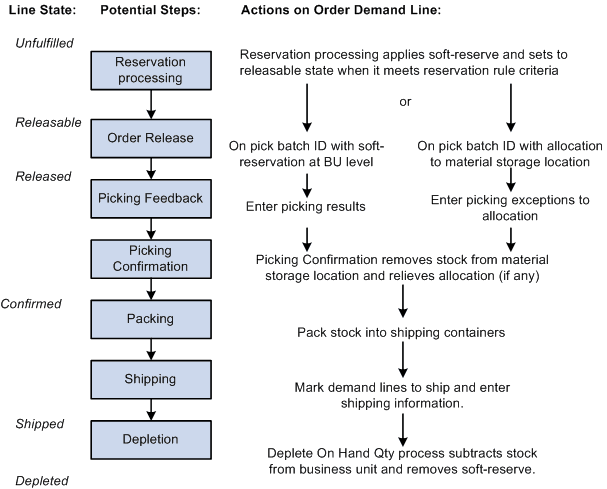
The following diagram illustrates the possible fulfillment steps that you might use for a soft-reserved item. This item can be allocated during the Order Release process or just keep the soft-reservation applied during reservations processing: