Processing Defaults Page
Use the Processing Defaults page (IN_FW_PROC_DFLT_SP) to change processing defaults for this request.
Navigation:
Select the Process Default link on the Fulfill Workbench page.
This example illustrates the fields and controls on the Processing Defaults page. You can find definitions for the fields and controls later on this page.
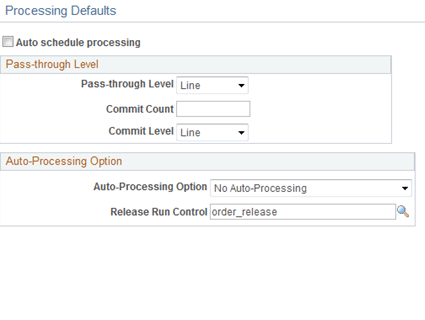
Review or change any processing defaults for this request. Initially this page displays the current fulfillment engine options that are defined in the environment at the business unit level (in the Setup Fulfillment component) or at the SetID level (on the Fulfillment Engine Options page). The fields available on this page are determined by the selection of the Allow Processing Overrides check box in the fulfillment engine options.
| Field or Control | Description |
|---|---|
|
Auto Schedule processing |
Select this check box to immediately process this request when you click the Process button on the Fulfillment Workbench page or the Fulfillment Queue page. Requests are placed in staging tables and then immediately processed by the fulfillment engine using the Fulfillment Requests process. |
|
Pass-through Level |
An entry here enables error-free transactions to process through the system while holding back transactions that need additional review. This field is available only with a reservations transaction request. The options are:
|
|
Commit Count |
(For reserve requests) Enter the number of lines that can be committed to the database together by the fulfillment engine; in other words, define the size of the commit group. |
|
Commit Level |
(For reserve requests) Select the level of commits based on the number of:
|
|
Auto-Processing Option |
Select the auto processing option to move your orders downstream to the desired state. The options available depend on the action chosen on the Fulfill Workbench page. Options include:
|
|
Release Run Control |
Select a run control for the Order Release Request process page. This run control contains the parameters to be used when auto-processing orders from an unfulfilled state to another downstream state. The Auto Processing Option field determines how far downstream the orders will be sent. |