Setting Up and Viewing Mass Changes to the Supply / Demand WorkCenter
Several alerts allow users to update related information in bulk. You need to consider any impact on all business unit before making mass changes in the Supply/Demand WorkCenter.
For the following alerts and analytics mass change functionality is enabled:
Alerts:
-
Demand Past Ship Date
-
Backlog Due to Ship
-
Demand Not Invoiced
-
Demand Not Depleted
-
On Hold Orders Past Ship Date
-
Purchase Orders Past Scheduled Due Date
-
Production Past Due
-
Overdue PAR Orders
-
Production Pending Shortages
-
Intransit Lines Past Due
-
Putaway Not Completed
Analytic:
-
INV-Inventory Demand
-
INV-PPAR Location MSRs
-
PO-Expected Receipts
-
PO-PAR Location Orders
Pages Used to Setup and View Mass Changes to the Supply / Demand WorkCenter
| Page Name | Definition Name | Usage |
|---|---|---|
|
IN_SDMC_EMAIL_TMPL |
Define roles, user ids, or e-mail addresses that need to be notified for a particular mass update |
|
|
IN_SDMC_CONFIG |
Setup Mass Change Notifications in the Supply/Demand WorkCenter |
|
|
IN_SD_MC_HIST_INQ |
View or purge mass change history .when no longer needed. |
Setup Mass Change Template Page
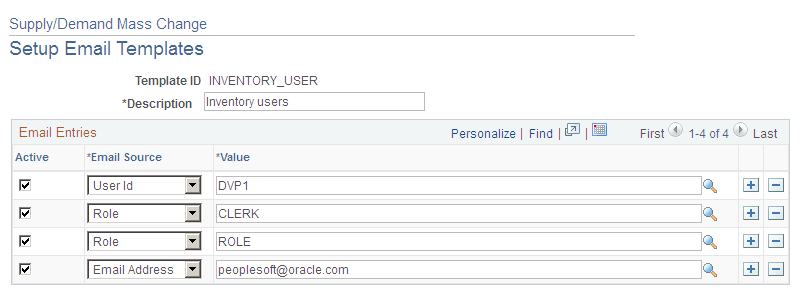
Use the Setup Mass Change Templates page (IN_SDMC_EMAIL_TMPL) to define roles, user ids, or e-mail addresses that need to be notified for a particular mass update
Navigation:
This example illustrates the fields and controls on the Setup Mass Change Template page.
Setup Mass Change Notification Page
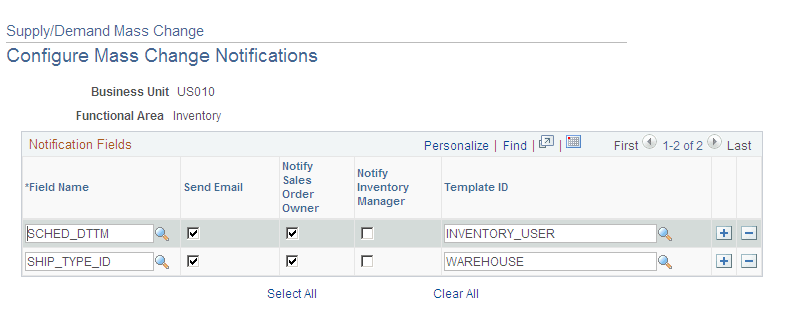
Use the Setup Mass Change Notification page (IN_SDMC_CONFIG) to setup Mass Change Notifications in the Supply/Demand WorkCenter
Navigation:
This example illustrates the fields and controls on the Setup Mass Change Notification page .
View/Purge Mass Change History Page
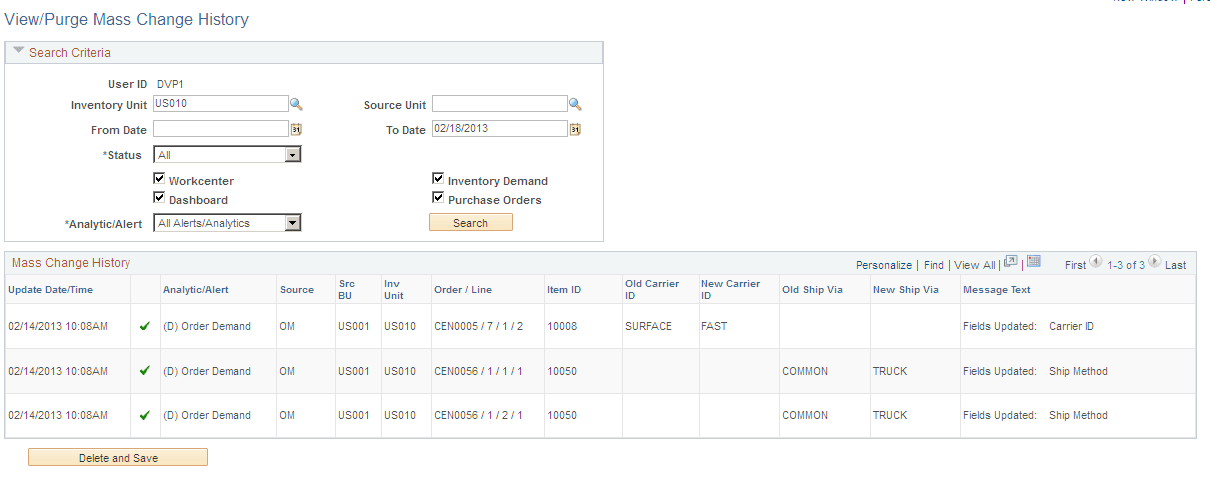
Use the View/Purge Mass Change History page to view or purge mass change history when no longer needed.
Navigation:
This example illustrates the fields and controls on the View/Purge Mass Change History page. You can find definitions for the fields and controls later on this page.
| Field or Control | Description |
|---|---|
|
Status |
Displays the outcome of a mass change request for an order line. The available options are :
|
|
WorkCenter |
Select the WorkCenter check box to view updates generated within the Supply/Demand WorkCenter. |
|
Dashboard |
Select the Dashboard check box to view updates generated within the Supply/Demand Dashboard. |
|
Inventory Demand |
Select Inventory Demand check box to view changes to Inventory Orders (Sales Orders and MSRs). |
|
Purchase Orders |
Select Purchase Orders check box to view lines for which a change requested was created. |
|
Analytic/Alert |
Select an option to display analytic alerts for:
|
|
Delete and Save |
Click this button to delete the mass change history that is currently displayed in the grid from the database. |