Establishing Contacts for a Lease
This topic discusses how to establish contacts for a lease.
Pages Used to Set Up Supplemental Contacts
| Page Name | Definition Name | Usage |
|---|---|---|
|
RE_LS_CONTACTS |
Assign role names to the principal contacts and track supplemental agreement contacts for the lease. |
|
|
Lease Contact Address Page |
RE_LS_CNT_ADDR_SEC |
Displays the principal contact address. |
|
External Contact Address Page |
RE_LS_EXT_ADD_SEC |
Add supplemental agreement contact's address. |
Contacts Page
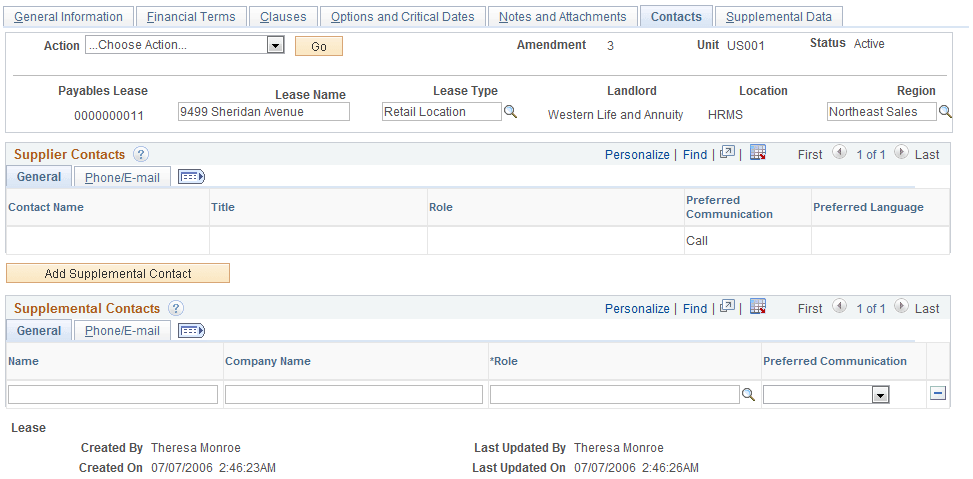
Use the Contacts page (RE_LS_CONTACTS) to assign role names to the principal contacts and track supplemental agreement contacts for the lease.
You can add supplemental contacts on this page.
Navigation:
This example illustrates the fields and controls on the Contacts page. You can find definitions for the fields and controls later on this page.
Customer or Supplier Contact
The contact information varies depending on the type of lease you are creating. The system populates the Customer Contacts information from the Contacts page on the supplier and customer setup table.
| Field or Control | Description |
|---|---|
|
Role Name |
Select the role name for your contact. The roles are related to critical dates. By defining roles ahead of time and assigning them to the contacts on the lease, you can later define in critical dates which roles receive notifications. If the roles exist as a lease contacts then a notification is sent to that role. |
|
Address |
Click the link to display the contact address. This address is stored on the supplier or customer table. |
Supplemental Agreement Contacts
| Field or Control | Description |
|---|---|
|
Name |
Enter the contact name. The format for this field is: last name,first name with no space between the names. |
|
Preferred Communication |
Select the preferred method of communication. Values are: Call, Email Only, Email, Prt, Fax, Mail, XML Only, and XML, Prt. |
|
Address |
Click the link to add the address for the supplemental contact. |