Staging Time Entries
This section discusses how to stage time entries for Project Costing processing. To stage time entries, use the Stage Time Entries (RUN_EXTRNPRC_WM) component.
Pages Used to Stage Time Entries
| Page Name | Definition Name | Usage |
|---|---|---|
|
RUN_EXTRNPRC_WM |
Stage time entries for PeopleSoft Project Costing processing. |
|
|
RUN_EXTRNPRC_BU |
Select the business units that are associated with the time entries. |
|
|
List |
PSRF_REPORTS_CHRON |
List generated reports. |
|
Explorer |
PSRF_REPORT_VIEWER |
Display a selected report. |
|
Administration |
CDM_CONTLIST |
Review the attributes of listed reports. |
|
Archives |
CDM_CONTLIST_ARCH |
Review archived reports. |
|
Process List |
PMN_PRCSLIST |
View the status of jobs that are processing. |
|
Server List |
PMN_SRVRLIST |
View and access servers. |
Stage Time Entries Page
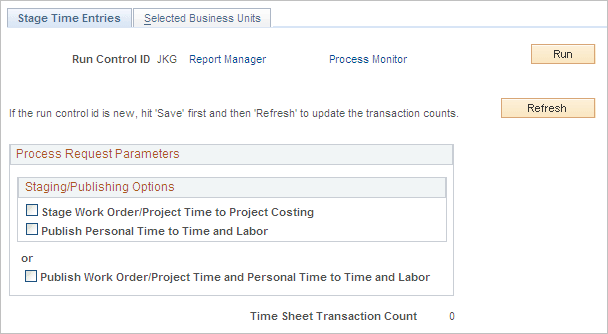
Use the Stage Time Entries page (RUN_EXTRNPRC_WM) to stage time entries for PeopleSoft Project Costing processing.
Navigation:
This example illustrates the fields and controls on the Stage Time Entries page. You can find definitions for the fields and controls later on this page.
| Field or Control | Description |
|---|---|
|
Stage Work Order/Project Time to Project Costing |
Select this check box to stage all work order task time entries to the Expenses staging table (EX_PROJ_RES_STG). |
|
Publish Personal Time to Time and Labor |
Select this option to publish personal time (non-work order) to PeopleSoft Time and Labor. Note: This process is optional. However, if you select this check box, the system automatically selects the Stage Work Order/Project Time to Project Costing check box above it. Note: The work order information is not carried over to the PeopleSoft Time and Labor application. |
|
Publish Work Order/Project Time and Personal Time to Time and Labor |
Select this check box to publish both the work order task time entries and personal time entries only to the PeopleSoft Time and Labor application. |
Selected Business Units Page
Use the Selected Business Units page (RUN_EXTRNPRC_BU) to select the business units that are associated with the time entries.
Navigation:
Select the Selected Business Units tab.
Select one or more business units that are associated with the time entries that you want to stage.