Using Alternative Item Groups
This topic discusses how to define alternate item groups.
Page Used to Define Alternate Item Groups
| Page Name | Definition Name | Usage |
|---|---|---|
|
IN_ALT_ITEM_GROUPS |
Define alternate item groups. |
Alternate Item Groups Page
Use the Alternate Item Groups page (IN_ALT_ITEM_GROUPS) to define alternate item groups.
Navigation:
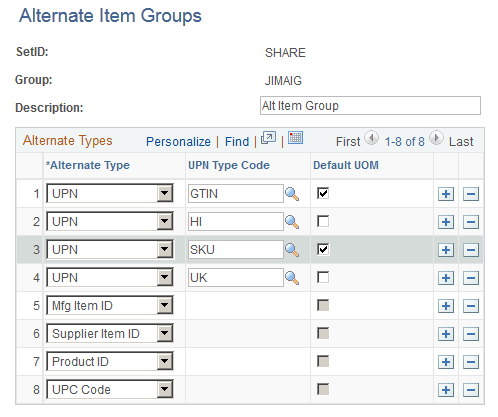
This example illustrates the fields and controls on the Alternate Item Groups page. You can find definitions for the fields and controls later on this page.
| Field or Control | Description |
|---|---|
|
Alternate Type |
Select the type of alternate item such as Universal Item ID Type or Manufacturer item ID. If you select UPN in this field, then you must select an option in the UPN Type Code field. |
|
UPN Type Code (universal product number type code) |
Select the UPN type code. |
|
Default UOM (default unit of measure) |
Select to indicate that the associated UOM should be used by the system as a default for the transaction. This option is only available when Universal Item Type is selected in the Alternate Type field. |