Automatically Consuming Lot-Controlled Stock During a Backflush
Backflush is a method of consuming components for a production ID or production schedule. The system backflushes components with an issue method of Issue or Replenish. Typically, backflushing occurs when completion or scrap quantity is entered for an assembly. Backflushing consumes material from the WIP locations.
When consuming lot-controlled components, the backflushing process must decide which lot IDs to choose within the WIP location. The backflush lot selection rule enables you to determine which lot IDs are automatically selected for consumption when a backflush is performed. The backflush lot selection rule can be defined at:
-
The business unit-level using the MFG BU Prnd Options page. The options for the backflush lot selection rule are located in the Backflush Lot Option group box and include:
-
Manual:(default) Select this option to require the user to enter the specific lot IDs consumed during backflushing. The system does not automatically select any lot IDs.
-
Earliest Expiration Date: Select this option to have the system select the lot IDs for consumption based on the lot expiration date. The system first selects the lots with the earliest expiration dates.
-
Earliest Available Date: Select this option to have the system select the lot IDs for consumption based on the available date. The system first selects the lots with the earliest available dates.
-
-
The business unit and item-level using the Define Business Unit Item - Manufacturing: General page. The options for the backflush lot selection rule are located in the Backflush Lot Option group box and include:
-
Default from BU: (default) Select to use the backflush lot selection rule defined at the manufacturing business unit level on the MFG BU Prnd Options page.
-
Manual
-
Earliest Expiration Date
-
Earliest Available Date
-
The backflush lot selection rule defined at the business unit and item combination (the Define Business Unit Item - Manufacturing: General page) overrides the option selected at the business unit level (the MFG BU Prnd Options page).
See PeopleSoft Managing Items: Define Business Unit Item - Manufacturing: General Page.
How the Backflush Process Uses the Backflush Lot Selection Rule
The backflush lot selection rule is used during the backflush process to determine the lots to consume from each WIP location for lot-controlled components. The Record Completions and Scrap-Edit/Issue Express page is one location where you can see some of the impacted fields:
This example illustrates the fields and controls on the The Record Completions and Scrap-Edit/Issue Express page. You can find definitions for the fields and controls later on this page.
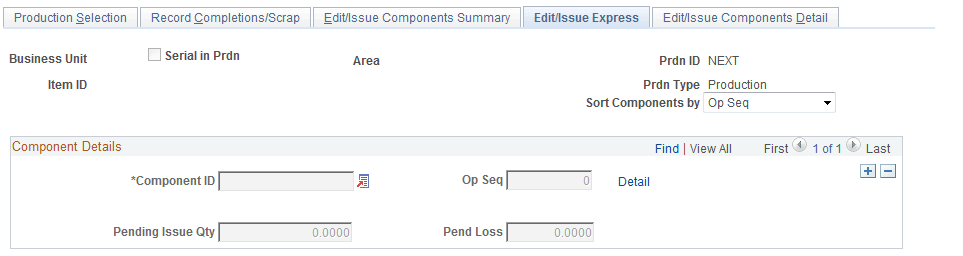
If the backflush lot selection rule is Manual, then the backflush process does not default lot IDs. You must manually enter the specific lot IDs and the quantity from each lot for consumed lot-controlled components.
If the backflush lot selection rule is Earliest Expiration Date or Earliest Available Date, then the backflush process consumes lot-controlled components by choosing the lot IDs and quantities from each lot ID within the WIP locations. The following rules are applied:
-
The backflush process does not override an existing lot entry but populates any blank fields or default-value fields.
-
The process can select one or more lots. For example, if 15 units are needed, the first 8 units are selected from lot L200, when this lot is exhausted then the last 7 units are selected from lot L500.
-
The process consumes lot-controlled stock until the consumed component is satisfied or the existing stock in the WIP location is exhausted. If there is not enough lot quantity in the WIP location, then the process leaves the remaining quantity in the pending issue quantity and pending loss quantity, as appropriate.
-
If the rule finds multiple lots in the WIP location that could be used, then the first tiebreaker is the opposite date (that is, the Earliest Expiration Date rule uses the earliest available date and the Earliest Available Date rule uses the earliest expiration date). If there still are multiple lots, then the next tiebreaker is the ascending lot ID value.
-
For consigned items, the process uses the stock in the owned WIP location. If more quantity is needed, then the non-owned WIP location is used.
The backflush lot selection rule cannot be applied to:
-
Items that are both lot-controlled and serial-controlled.
-
Items using serial genealogy.
-
Items that has the component issue method of Kit.
For these items, the backflush lot selection rule is set to the value of Manual.
Components Impacted by the Backflush Lot Selection Rule
The backflush lot selection rule is applied during backflush and impacts the following components:
-
Record Completions and Scrap (Production Control, Process Production, Complete Production, Record Completions and Scrap).
-
Edit/Issues Components (Production Control, Process Production, Issue Materials, Edit/Issue Components).
-
Receive Subcontract Assembly (Production Control, Process Production, Subcontract Production, Receive Subcontract Assembly).
The above components can be used in online or deferred mode. If you are using the online mode (PID Completion Option on the MFG BU Prdn Options page), the online pages display the results of the backflush lot selection rule; that is, the lot ID and quantity to be consumed from the WIP location. You can view and override the selected lot IDs and quantities. If you are using the deferred mode (PID Completion Option on the MFG BU Prdn Options page), the system does not consume the components until later; however, you can use the online pages to enter override lot IDs and quantities.
Using the online mode, if the backflush process has completed and then a field is changed that causes the pending quantities field to be recalculated, this causes a recalculation of backflush lot selection rule. Fields that trigger the recalculation of the pending quantities include:
-
Completion Quantity
-
Scrap Quantity
-
Completion Op Sequence
-
Back thru Op Sequence
-
Component ID
-
Component's Op Sequence
-
Component's Qty Code
-
Component's Qty Per
-
Picking a substitute item
In addition, entering a pending issue quantity or a pending yield loss quantity when there is no completion or scrap quantity triggers the calculation of the backflush lot selection rule. If the lot consumption fields have already been populated and then you manually change the pending issue quantity or a pending yield loss quantity, the system displays the following message:
Message Text: Recalculate the Lot IDs to consume (Y/N)?
Explanation: You have modified the pending issue or pending loss quantity for a component that contains values in its lot scroll. Select Yes to clear the lot scroll and repopulate based on the entered quantity - all other occurrences of this component on the component list which share the same WIP location will also have their Lot IDs recalculated. Select No to keep the pending quantity entered without changing the lot scroll - you will then need to modify the lot scroll so that its quantities correspond with the pending quantity entered. Select Cancel to cancel the action - the original pending quantity will be restored and the lot scroll will not be modified.
Using the Production Completions and Scrap Process with the Backflush Lot Selection Rule
Prdn Compl/Scrap (SFPDCDRV) process (Production Completions and Scrap process) can perform a backflush and looks to the backflush lot selection rule to determine the method for the lot consumption from the WIP locations. This Prdn Compl/Scrap process is located in both the SCM Integrations menu (SCM Integrations, Process Transactions, Manufacturing, Process WO Completions) and the Production Control menu (Production Control, Process Production, Complete Production, Process Completions and Scrap). The Production Completions and Scrap process uses data stored in the BCT tables to update the production tables and can record completions and scrap for:
-
Electronic data collection files and other EIP messages. The data transactions are stored in the BCT tables.
-
Online components using the deferred mode (PID Completion Option on the MFG BU Prdn Options page). The online data entry is stored in the BCT tables.
If you have selected the backflush lot selection rule of Earliest Expiration Date or Earliest Available Date, then the incoming files are not required to have a lot ID for consumed components. The lot ID is assigned during the Production Completions and Scrap process; therefore, the incoming files are not put in the error status for correction in the Transaction Maintenance component (SCM Integrations, Transaction Error Handling, Maintain Transactions, Transaction Maintenance). If the incoming file does contain some lot IDs for consumed components, then the Prdn Compl/Scrap process uses those entries rather than the backflush lot selection rule. In addition, the incoming files must contain the lot IDs for consumed components if you have selected the backflush lot selection rule of Manual.
See Running the Completions Update COBOL/SQR Process (SFPDCDRV).
Setting Up the Backflush Lot Selection Rule
Before changing the backflush lot selection rule in your PeopleSoft system, you should examine the physical movement in your WIP locations to:
-
Verify the physical usage of the lot components in the WIP locations match the chosen backflush lot selection rule. For example, if stock with the earlier expiration date is selected first from the WIP location during production, then you should select the Earliest Expiration Date option for the backflush lot selection rule.
-
Ensure your data movement transactions to and from the WIP locations are accurate and promptly recorded. If you are using data collection systems for material movement or completions and edit component transactions, the batch jobs that process these transactions must be processed in a timely manner.
-
Confirm that you have one primary method for entering completion transactions. If you vary the method used to record completions, (for example; sometimes using data collection completions and sometimes using on-line pages), then the backflush lot selection rule may cause inaccurate results due to timing issues.
Before changing the backflush lot selection rule, it is recommended that you process all pending transactions in the staging tables (BCT tables) that impact production completion. If pending transactions are in the BCT tables, use caution when changing the backflush lot selection rule on the MFG BU Prnd Options page or the Define Business Unit Item - Manufacturing: General page. Changing the rule can impact how the pending transactions are processed.