Creating Payables Business Units Using Business Unit Management
The Business Unit Management feature allows you to setup General Ledger and sub-ledger business units using the PeopleTools Activity Guide. It combines the most common components used to create General Ledger and sub-ledger business units into a single location so that you can use one central component.
The activity guide combines the most common components used to create General Ledger and sub-ledger business units into a single location so that you can use one central component. For additional information on the Business Unit Management activity guide, see PeopleSoft General Ledger: Managing Business Units
You can create Payables business units using the Payables Definition step on the business unit management activity guide. You can create an AP business unit only if the detail ledger is attached to the GL business unit.
Note:
The procurement accounting control details are copied from the source General Ledger business unit. If you are creating a new General Ledger business unit, then you use the GL business unit of the first row in the grid to create procurement accounting control details.
Follow these steps to create Payables business units using the Business Unit Management feature:
-
Enable the Business Unit Management feature for Payables by selecting Accounts Payable on the PeopleSoft General Ledger: Source System Page.
-
Create a new ledger using the PeopleSoft General Ledger: Create New Ledger Page.
-
Enter basic business unit information using the PeopleSoft General Ledger: Basic Information page.
-
(Optional) Define additional business unit information - such as incremental calculation method - using advanced features.
-
Define ledgers for a business unit using the PeopleSoft General Ledger: Ledgers For A Unit Page.
-
Define Payables defintions and specify its default processing options using the Payables Definition Page and Business Unit Definition Page.
Pages Used to Create Payables Business Units Using Business Unit Management
| Page Name | Definition Name | Usage |
|---|---|---|
|
AP_BU_COPY_FL |
Search, modify, add, and copy Payables business units. |
|
|
BUS_UNT_TBL_AP1_FL |
Create a Payables business unit. |
Payables Definition Page
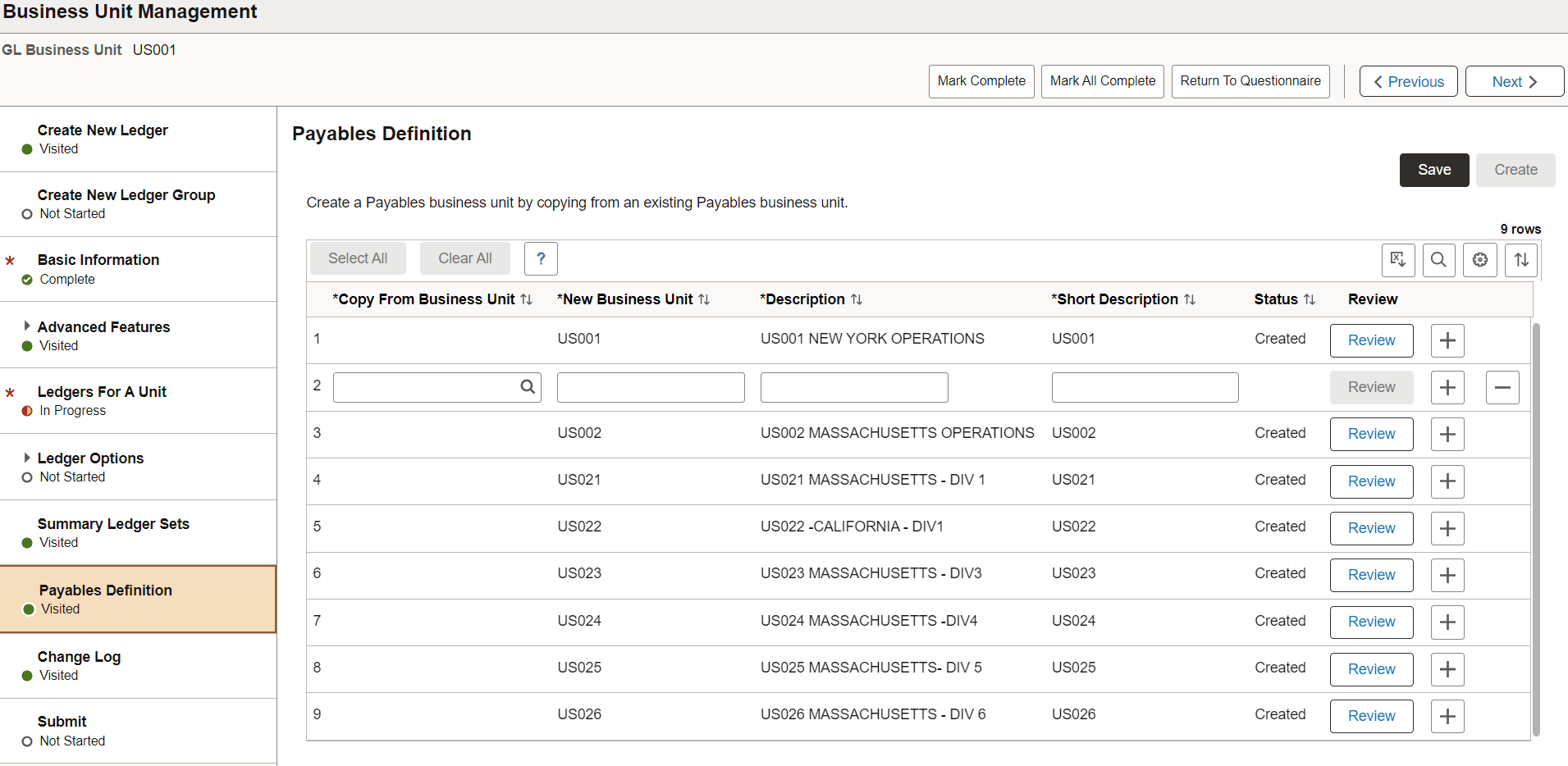
Use the Payables Definition page (AP_BU_COPY_FL) to search, modify, add, and copy Payables business units.
Navigation
This example illustrates the fields and controls on the Business Unit Management - Payables Definition page.
| Field or Control | Description |
|---|---|
|
Copy From Business Unit |
Enter an AP business unit from which the new business unit will be copied. |
|
New Business Unit |
Enter a name for the new AP business unit. |
|
Description and Short Description |
Enter a description and a short description for the new AP business unit. These are mandatory fields. |
|
Status |
Displays the status of the AP business unit. The available options are:
|
|
Create |
Click to create a new AP business unit. |
|
Review |
Click to update the Payables Definition and Procurement Control options. Review button is available only after the AP business unit is created. For more information on Payables Definition page, see Defining PeopleSoft Payables Business Units. See Defining Procurement Controls for General Ledger Business Units for additional information on Procurement Control page. |
You can use the Questionnaire page to answer the first set of questions that determine which steps are displayed in the activity guide.
This example illustrates the fields and controls on the Questionnaire page.

For more information see, PeopleSoft General Ledger: Questionnaire Page
Business Unit Definition Page
Use the Business Unit Definition page (BUS_UNT_TBL_AP1_FL) to create a Payables business unit.
Navigation:
Click Review button to update the Payable Definition.
This example illustrates the Business Unit Definition page.
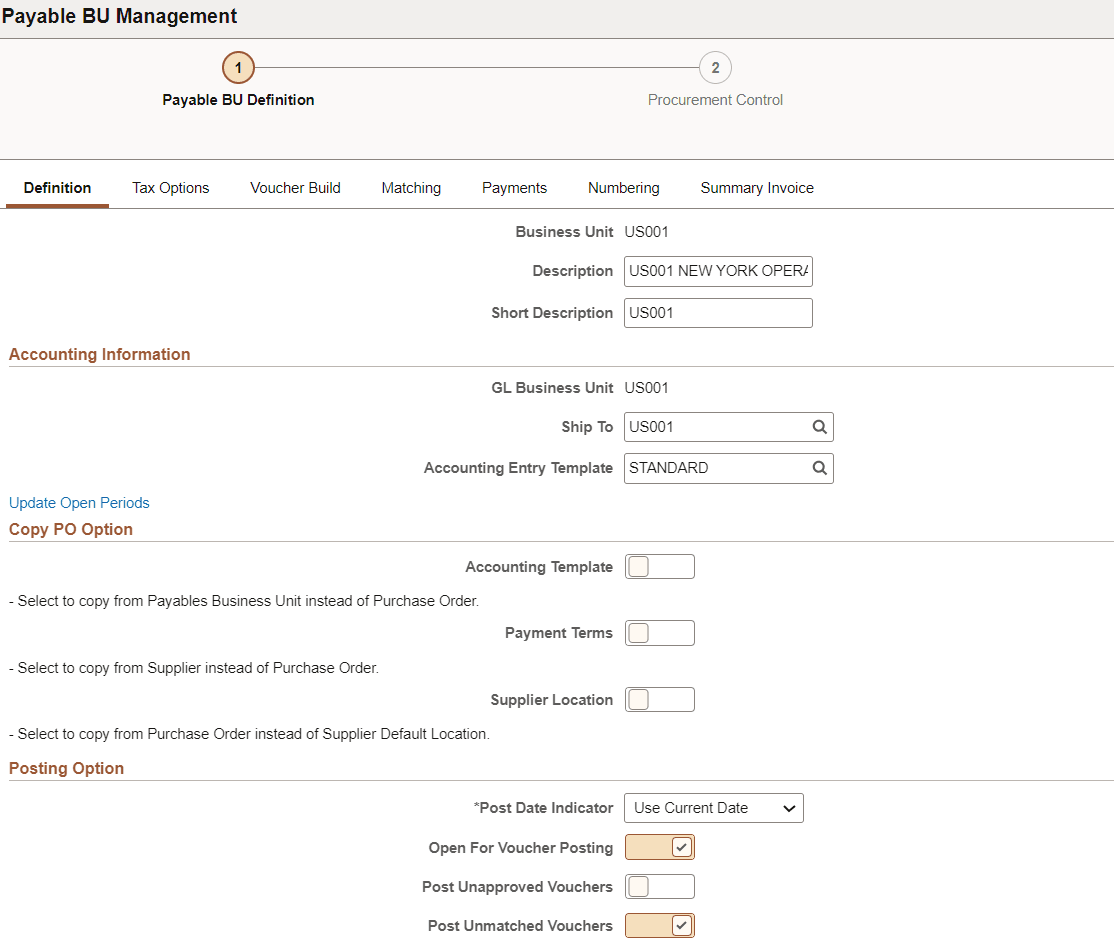
See the Payables Definition - Definition Page for field definitions.
For field definitions of the other tabs, see the following:
-
Tax Options: Payables Definition - Tax Options Page
-
Voucher Build: Payables Definition - Voucher Build Page
-
Matching: Payables Definition - Matching Page
-
Payments: Payables Definition - Payments Page
-
Numbering: Payables Definition - Numbering Page
-
Summary Invoice: Payables Definition - Summary Invoice Page
Procurement Control Page
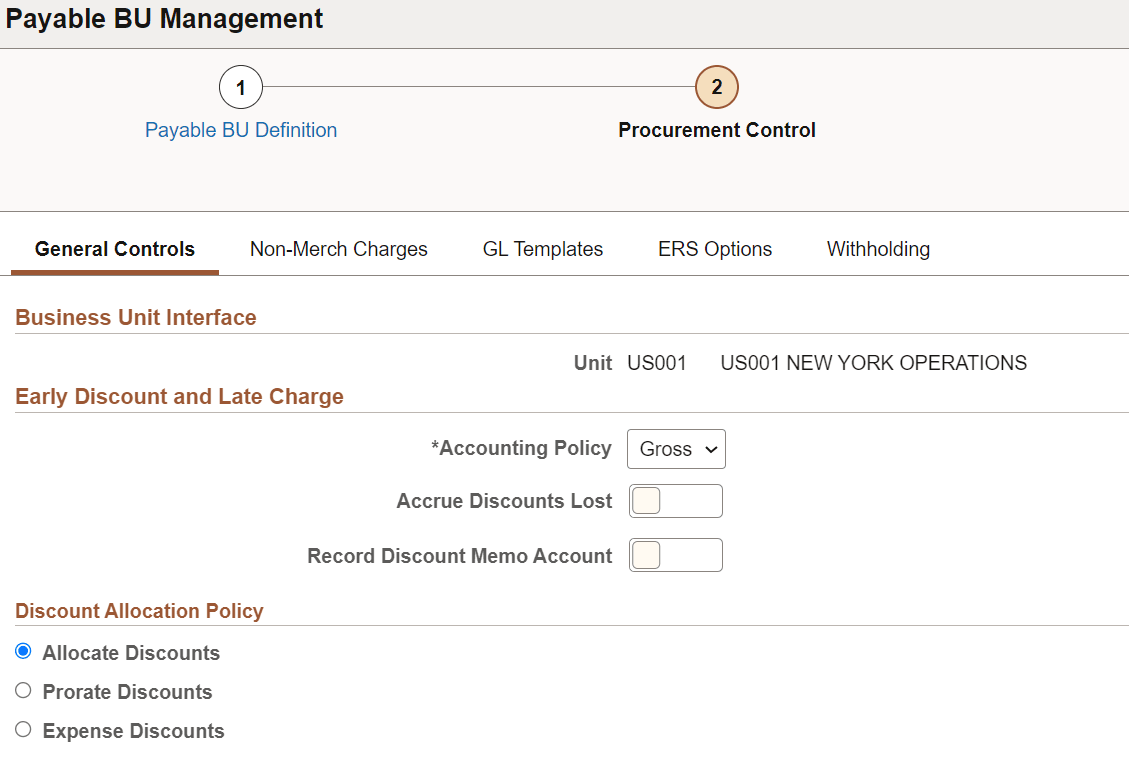
Use the Procurement Control page (BUS_UNIT_INFC1_FL) to define the procurement controls.
Navigation:
Click Review button to update the Procurement Controls.
This example illustrates the Procurement Control page (1 of 2).
This example illustrates the Procurement Control page (2 of 2).
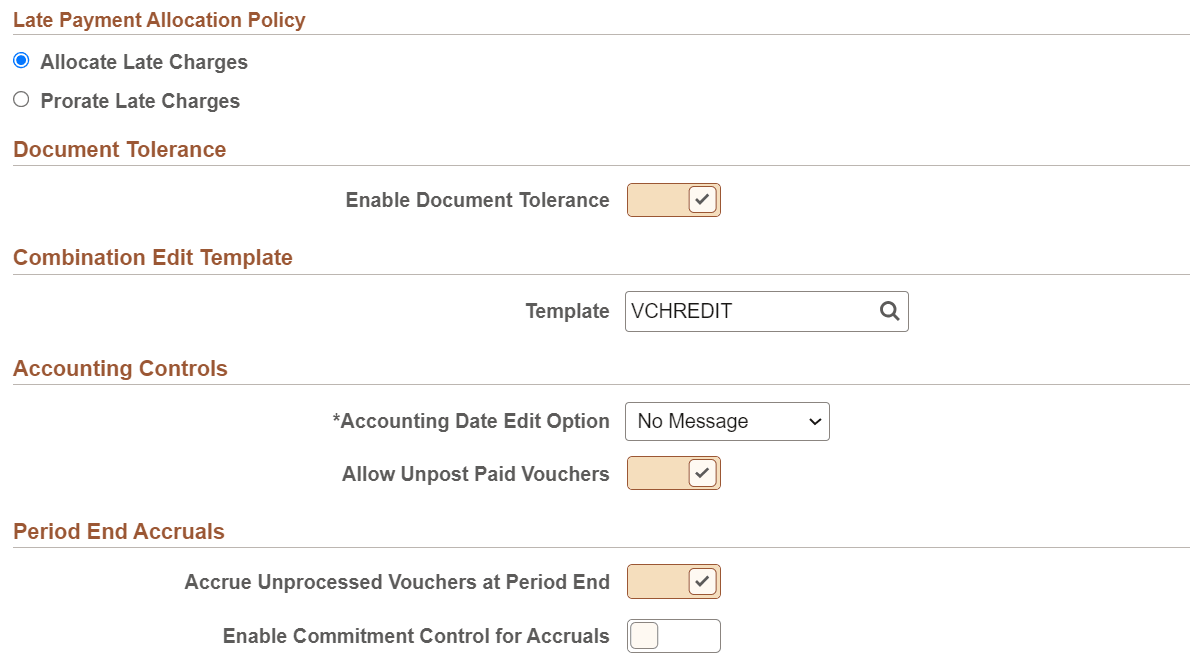
See the Procurement Control - General Controls Page for field definitions.
For field definitions of the other tabs, see the following:
-
Non-Merch Charges: Procurement Control - Non-Merch Charges Page
-
GL Templates: Procurement Control - GL Templates Page
-
ERS Options: Procurement Control - ERS Options Page
-
Withholding: Procurement Control - Withholding Page