EFT and ACH Payments
Both EFT and ACH payments are paperless formats. Both require that you create an electronic file that contains the necessary bank or clearinghouse information. The electronic layout and data requirements for EFT and ACH payments are set up for PeopleSoft Payables when you set up banks and counterparties.
Note:
Before sending EFT or ACH payments, you can establish a prenote test to verify that the data is received in the correct format.
EFT and ACH Payment Processing
EFT and ACH payments differ primarily with regard to the party who processes the payments.
-
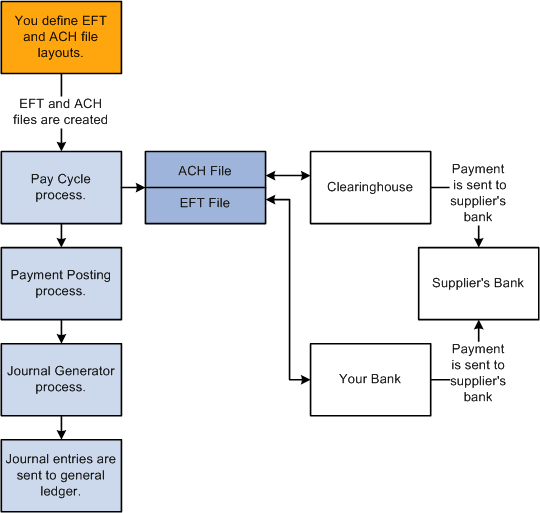
EFT payments involve the electronic movement of funds usually through a payment system such as the ACH network or Fedwire. The four largest EFT systems are Fed Wires, ACHs, Swift, and Chips. For EFT payments, you send all applicable payments in one file to your bank for payment. The bank then sends the payments through the appropriate ACH payment system to the supplier's bank.
-
For ACH payments, you send all applicable payments in one file to your financial institution. If the financial institution is a member of a clearinghouse, then the clearinghouse sends the payments to the supplier's bank for payment.
EFT and ACH payments can also be processed through Pay Cycle Manager using PeopleSoft Financial Gateway functionality. In this case, PeopleSoft Financial Gateway functionality sends the payment to the applicable party for processing.
After payment files are sent to a bank or clearinghouse, the payments are posted and the accounting entries are generated and sent to the general ledger.
This diagram shows the process flow for EFT and ACH payments.
Note:
If you run PeopleSoft Payables on a DB2 database on a Windows NT or OS390 server, you must manually insert an owner ID parameter into the list of parameters for the process definition before you can run the Format EFT Files SQR process (FIN2025) to create EFT files.
To do so, select On the search page, enter FIN2025 for the Process Name. On the Override Options tab, under the Prepend Parameter List, add the following text to the beginning of the list of parameters: %%OWNERID%%. Be sure to leave a space between the owner ID parameter and :EFT_WRK_PARM1.
EFT and ACH Prenotes
This PeopleSoft application provides the availability of prenote verification for EFT and ACH payments. Your bank can verify the accuracy of the electronic payment data (for example, bank transit number and account number) in a test transaction before the actual transaction occurs. Prenotes are available for PPD, CCD+, and CTX payment formats.
You can use either the Pay Cycle Manager or the PeopleSoft Financial Gateway for formatting the prenote output file to the bank. If you generate the output file using pay cycle, the bank does not issue a prenote error notification. If you generate the output file using PeopleSoft Financial Gateway, you receive a prenote error notification from the bank if an error exists. PeopleSoft Financial Gateway creates a prenote error message and sends it to PeopleSoft Payables, which then:
-
Inserts the prenote error into the Pay Cycle Error table (PYCYCL_ERR_TMP).
-
Updates the prenote status in the Supplier Pay table (VENDOR_PAY) from P (pending) to R (rejected).
-
Sends an email notification to the user.
This function requires that you specify a user ID on the Payment Selection Criteria - Preferences page as well as define a valid email address on the User Preference page.