Escheating Individual Payments
This section discusses how to escheat a payment.
Page Used to Escheat Individual Payments
| Page Name | Definition Name | Usage |
|---|---|---|
|
PYMNT_ESCHEAT |
Escheat payments. |
Related Topics
Payment Escheatment Page
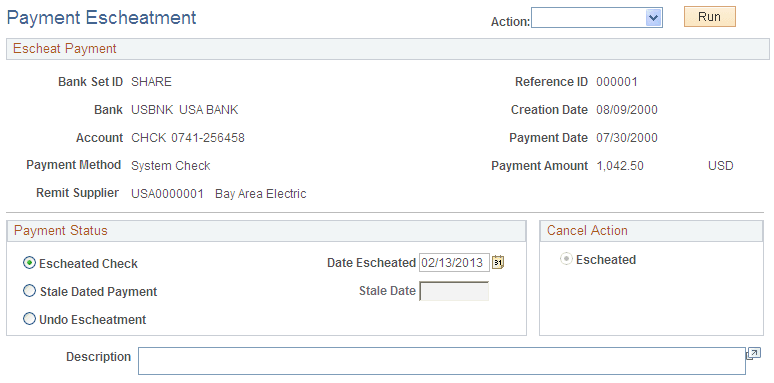
Use the Payment Escheatment page (PYMNT_ESCHEAT) to escheat payments.
Navigation:
This example illustrates the fields and controls on the Payment Escheatment page. You can find definitions for the fields and controls later on this page.
| Field or Control | Description |
|---|---|
|
Action |
Select to run one of the following on-demand processes after you have marked and saved the escheatment. This creates the necessary reversal accounting entries.
See Payment Escheatment. |
Payment Status
| Field or Control | Description |
|---|---|
|
Escheated |
Select to classify the payment as escheated. The Date Escheated field becomes available for entry. |
|
Stale Dated Payment |
Select to classify the payment as stale-dated. The Stale Date field becomes available for entry. |
|
Undo Escheatment |
Select to remove the escheatment classification. |
Cancel Action
| Field or Control | Description |
|---|---|
|
Escheated |
When you select Escheated in the Payment Status group box, the system selects the Escheated option in the Cancel Action group box. The Payment Posting process creates accounting entries that reverse the cash entries to an escheatment liability account, which you predefine on the Accounting Entry template. Note: The system uses the escheatment date to compare to the effective date of the Accounting Entry template and then selects the active template. |