Forecasting Payments
Pages Used to Forecast Payments
| Page Name | Definition Name | Usage |
|---|---|---|
|
PYFRCST_CYCLE |
Define forecast cycles that determine the universe of scheduled payments that can be selected for a payment forecast. |
|
|
PYFRCST_BANK |
Review payment forecasts by bank. Review summarized amounts for each period in your forecast cycle. If a category does not appear, no payments are scheduled for that period. |
|
|
PYFRCST_DELETE |
Reset the forecast cycle and adjust the parameters to review various what-if scenarios. |
|
|
Forecast Report Request Page |
PYFRCST_RQST |
Define run parameters for the Payment Forecast report (APY2040). Use the report to examine your payment forecasts. |
Forecast Cycle Page
Use the Forecast Cycle page (PYFRCST_CYCLE) to define forecast cycles that determine the universe of scheduled payments that can be selected for a payment forecast.
Navigation:
This example illustrates the fields and controls on the Forecast Cycle page. You can find definitions for the fields and controls later on this page.
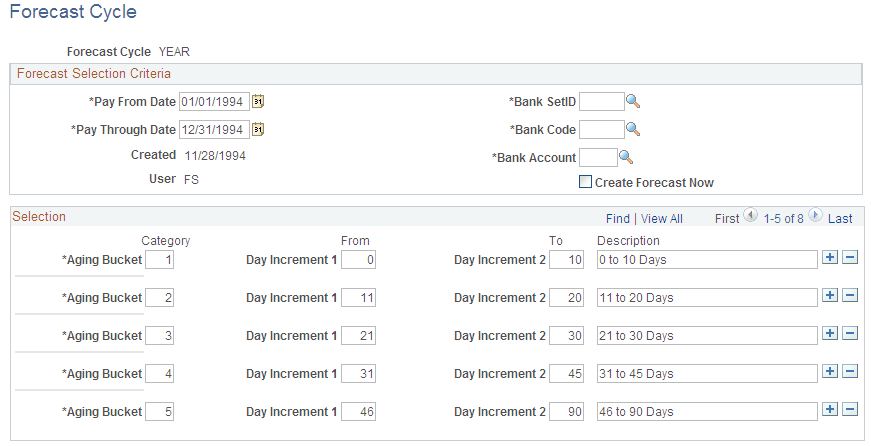
Forecast Selection Criteria
| Field or Control | Description |
|---|---|
|
Pay From Date |
Enter the beginning date for your forecast cycle. All payment schedules pay dates equal to or greater than the pay from date are included in your forecast. |
|
Pay Through Date |
Enter the ending date for your forecast cycle. All payment schedules with a scheduled pay date equal to or less than the pay through date are included in your forecast. |
|
Created |
Displays the date for the last time that this forecast cycle was processed. |
|
User |
Displays the user ID of the user who ran this forecast cycle the last time that it was processed. |
|
Bank SetID |
Enter your bank SetID, bank code, and bank account number. |
|
Create Forecast Now |
Initiates the Payment Forecast process. The system evaluates your unpaid payment schedules and summarizes the data for your review on the Forecast by Bank Account page. |
Selection
| Field or Control | Description |
|---|---|
|
Category |
Defines the time interval in which the forecast results can be viewed and reported upon. Your categories can be of different lengths. For example, the forecast calendar could start on a daily basis for two weeks, continue to a weekly basis for eight weeks, and then switch to a monthly basis for the next twelve months. |
|
From |
Enter the first day for the time span and the last in the To field. Subsequent intervals build upon each other. |
Forecast by Bank Account Page
Use the Forecast by Bank Account page (PYFRCST_BANK) to review payment forecasts by bank.
Review summarized amounts for each period in your forecast cycle. If a category does not appear, no payments are scheduled for that period.
Navigation:
| Field or Control | Description |
|---|---|
|
Forecast Cycle |
Displays the name of the forecast cycle. |
|
Bank SetID |
Displays the SetID associated with the bank code and account that has payments scheduled within the forecast cycle timeframe. |
|
Bank Code |
Displays the bank code associated with the bank account that has payments scheduled within the forecast cycle timeframe. |
|
Bank Account |
Displays the bank account that has payments scheduled within the forecast cycle timeframe. |
|
Created By |
Displays the user name who ran this forecast cycle the last time the forecast cycle was processed. |
|
Created |
Displays the date that the forecast cycle was created. |
|
Pay From Date |
Displays the beginning date for your forecast cycle. |
|
Pay Through Date |
Displays the ending date for the forecast cycle. |
Forecast by Period
| Field or Control | Description |
|---|---|
|
From |
Displays the date associated with the first day for the time span. |
|
Through |
Displays the date associated with the last day for the time span. |
|
Amount |
Displays the total amount for the scheduled payments due within the date range listed. The currency for the scheduled amount also appears. |
|
Scheduled Payments |
Displays number of scheduled payments that are due within the date range listed. |
Reset Forecast Cycle Page
Use the Reset Forecast Cycle page (PYFRCST_DELETE) to reset the forecast cycle and adjust the parameters to review various what-if scenarios.
Navigation:
| Field or Control | Description |
|---|---|
|
Payment Forecast Cycle |
Displays the name of the payment forecast cycle. |
|
Do Not Delete |
Ensures that if you click Save, nothing related to the forecast cycle definition that you created is deleted. |
|
Delete Forecast Results Only |
Erases the results of a forecast, so that you can run it again. |
|
Delete Both Results and Cycle |
Deletes the results and the definition of the forecast cycle. |