Review Period End Accrual Selection Page
Use the Review Period End Accrual Selection page (PE_ACCRL_RQST1) to review accrual information prior to running the create period end accrual process.
Navigation:
Accounts Payable, Batch Processes, Vouchers, Period End Accrual, Create Period End Accruals
Click the Review Business Unit Details link on the Period End Accrual Processing page.
This example illustrates the fields and controls on the Review Period End Accrual Selection page.
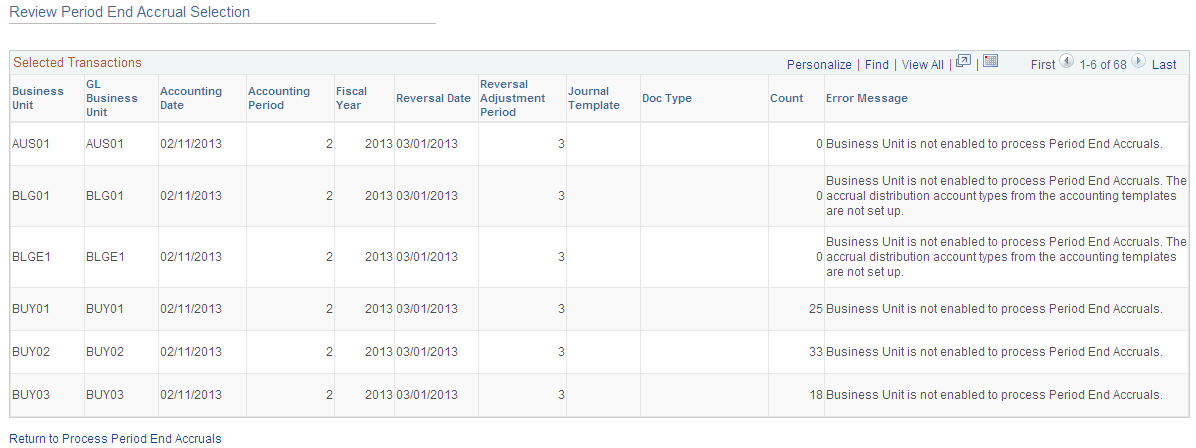
The accrual reversal accounting date will be derived by selecting the first day of the next accounting period from the date provided in the run control. The system will create the accrual reversals by reversing the amounts found on the accrual entry and set the accounting date to reversal date. The system will create the expense reversal by reversing the amounts found on the expense entry.
The Review Period End Accrual selection allows users to review accrual information as well as any known errors that may be encountered will be listed such as:
-
No journal generator template setup in the business unit setup.
-
Control check box at the BU level has not been checked and does not allow period end accruals.
-
Periods for the applications are still open.
-
Business unit is not enabled to process period end accruals.
Note:
The system displays an estimate of the number of vouchers that are eligible to be processed by Period End Accrual process. During the process, the number of vouchers processed may be different, depending on the detail rules when accounts are excluded, Control Group rules, if applicable, etc.