Updating Selective Payments in PeopleSoft Payables
This section provides an overview of the Selective Payment Update page for making payment updates.
Pages Used to Update Selective Payments in PeopleSoft Payables
| Page Name | Definition Name | Usage |
|---|---|---|
|
VCHR_PYMT_WRK |
Record and update manual payments |
Selective Payment Page
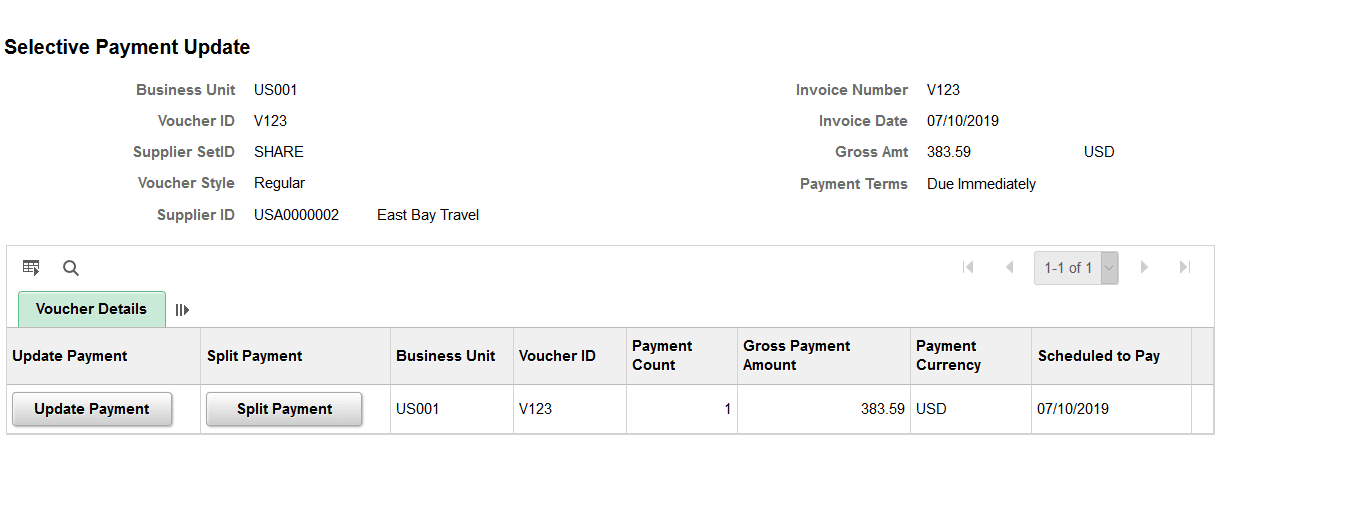
Use the Selective Payment page (VCHR_PYMT_WRK) to record and update manual payments.
Navigation:
This example illustrates the fields and controls on the Selective Payment page. You can find definitions for the fields and controls later on this page.
| Field or Control | Description |
|---|---|
|
Update Payment |
Select to access the Selective Payment page secondary page where you can update payment details. |
| Field or Control | Description |
|---|---|
|
Split Payment |
Select to access the Selective Payment page secondary page where you can split payments and view payment details. |
Payment Details
Displays details about the scheduled payments for the vouchers.
Remit Supplier Details
Displays details about the Remit Supplier which includes the Supplier name, Supplier Location, and Address Bank.
Bank Details
Displays Payment/Bank Details page.
Payment Message
Displays any message you entered on the Payment Message page in the Voucher component.
Payment Note
Use the Payment Note field to enter any notes when you update the payments. Your notes will be available for view on the Regular Voucher entry page.