Importing Time, Expense, and Progress Log Data into PeopleSoft Project Costing
Pages Used to Integrate Time and Expense Data into PeopleSoft Project Costing
| Page Name | Definition Name | Usage |
|---|---|---|
|
SPF_PROJ_EXP |
Run the Export Time and Expenses to Staging table for Projects process to export approved time, expense, and progress log data in PeopleSoft Services Procurement to the Project Transaction staging table. |
|
|
PC_SP_TO_PC |
Import approved time, expense, and progress log data into PeopleSoft Project Costing from PeopleSoft Services Procurement. |
Export Services to Projects Page
Use the Export Services to Projects page (SPF_PROJ_EXP) to run the Export Time and Expenses to Staging table for Projects process to export approved time, expense, and progress log data in PeopleSoft Services Procurement to the Project Transaction staging table.
Navigation:
See PeopleSoft Services Procurement: Integrating with PeopleSoft Project Costing.
Services Procurement Page
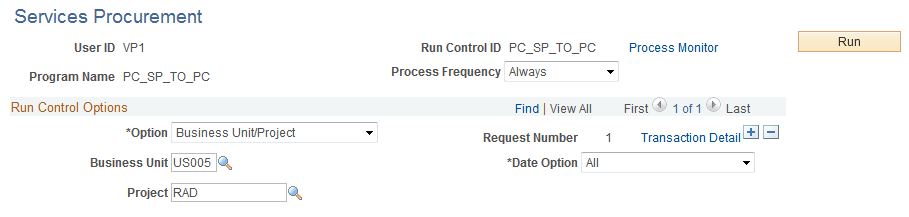
Use the Services Procurement page (PC_SP_TO_PC) to import approved time, expense, and progress log data into PeopleSoft Project Costing from PeopleSoft Services Procurement.
Navigation:
This example illustrates the fields and controls on the Services Procurement page. You can find definitions for the fields and controls later on this page.
| Field or Control | Description |
|---|---|
|
Option |
Select an option to import time, expense, and progress log entries for all activities or for specific ones. Options are:
|
|
Date Option |
Select Accounting Date, All, or Transaction Date for the system to use to determine eligible transactions. For example, if you select Accounting Date and enter a date range of December 1 to December 31, the system selects only those transactions in the Project Transaction staging table with an accounting date that falls in the range. |
|
From Date and Through Date |
Enter the range of dates to process based on the selected Date Option. |
|
Run |
Click to initiate the Services Procurement to Project Costing process and import the specified time, expense, and progress log data to the Project Transaction table. |
During the integration process, the system converts expense amounts that differ from the business unit currency if the appropriate exchange rates are set up.
When the process completes, you can view time, expense, and progress log transactions on the Transaction List page that are imported into the Project Transaction table as follows:
-
Expenses appear as transactions with the analysis type that is specified on the Installation Options - Project Costing Integration page for Expenses.
The delivered default analysis type is ACT.
-
Time reports appear as transactions with the analysis type specified on the Installation Options - Project Costing Integration page for Mobile Time / Expense.
The delivered default analysis type is TLX.
-
Incident based assignments from time sheets appear as transactions with the analysis type specified on the Installation Options - Project Costing Integration page for sPro Assignment Incident.
The delivered default analysis type is INC.
-
Progress logs appear as transactions with the analysis type specified on the Installation Options - Project Costing Integration page for sPro Progress Log.
The delivered default analysis type is SPL.
Note:
You cannot drill down to the source transactions in PeopleSoft Services Procurement by using the Drill to Source icon on the Transaction List page.