Return to Vendor Streamline Processing
You can use return to vendor streamline processing options when returning goods to suppliers for inventory-related transactions. This process eliminates the need to go back and forth between PeopleSoft Purchasing and Inventory and simplifies several inventory reduction options to a single step. Also, return to vendor transactions between PeopleSoft Purchasing and Production Control subcontracts can use streamline processing. Subcontracting is a production process where components or end items are sent to outside suppliers for end-item processing, such as a rework or an inspection. When a supplier return is necessary, the subcontracting process applies the return as scrap when the return is for credit.
Note:
The RTV Streamline feature is an optional feature, and you can still use the manual multistep method of returning inventory or subcontract items to the supplier.
Using streamline processing for supplier returns, you can:
-
Use the Express option and ship or scrap goods immediately using the Source Information tab on the Maintain Return To Vendor page in Purchasing.
This is the RTV process option that by creating data-collection transactions causes the inventory issue (automatic issue) or adjustment (automatic adjustment) action to be performed from the PeopleSoft Purchasing RTV component.
-
Use the Fulfillment option to schedule the fulfillment process and generate a pick plan for warehouse personnel to pick and ship goods back to the supplier.
This is the RTV process option that by creating material stock request transactions causes the RTV transaction to be processed through the PeopleSoft Inventory fulfillment process.
-
Create data-collection transactions for subcontract related transactions that cause the subcontract completions or negative completions action to be performed from the PeopleSoft Purchasing RTV and Receiving components.
Subcontract or outside processing for items represent services provided by suppliers. These items can be noninventory items that represent the actual supplier contribution in the build process. The subcontract item appears on the purchase order and accounts payable invoice. Subcontracting is the manufacturing environment where part of the manufacturing process is processed outside or subcontracted. This is when a customer maintains and manages an internal manufacturing environment, dealing with production IDs, bills of materials, and routings.
-
Send automatic notifications to warehouse personnel when the Manual option is being used for inventory lines on the RTV.
The Events and Notifications function generates and issues the email notification messages and worklist entries. When the inventory manager has been notified, the system updates the notification status on the RTV.
Using the Express inventory process option on the RTV line and when the RTV line disposition is Ship, the RTV component creates the material stock request in a Shipped status, creates shipping documents, such as the packing list, and dispatches the RTV transactions to the supplier, all in one step. When the return line disposition is Destroy, you can use express processing to create the Inventory return to vendor, adjust inventory balance, and dispatch the return transactions to the supplier at the same time. The system makes parallel changes in PeopleSoft Inventory for the processing of issue and adjustment transactions related to PeopleSoft Purchasing RTV express processing.
Note:
The RTV Streamline feature is not enabled when the PeopleSoft Inventory business unit uses an external warehouse control (Warehouse Management System (WMS)). The system cannot synchronize balances for express issue and adjustment functions performed within PeopleSoft Inventory. You use the Inventory Business Unit Options page to set external warehouse control for an Inventory business unit.
To set up RTV Streamline functions, you begin by defining user preferences and business unit options. These settings define default values that the system uses for RTV express processing. After you establish default values, you use the Add/Update RTV component to maintain the dispatch option and source information for express processing.
Using the dispatch option, you define how to dispatch the RTV. This can be either manually or when the RTV is shipped. Manual processing requires that you submit the RTV Dispatch/Print process from the Process Scheduler. When RTV is shipped value is selected, the system automatically submits the RTV Dispatch/Print process when the RTV status is set to Shipped.
Source information includes the PeopleSoft Inventory process and status, and subcontract details. The Inventory process defines how the system processes each RTV line in PeopleSoft Inventory. When you use manual processing, you must use the PeopleSoft Inventory Express Issue component to issue Inventory returns being shipped to the supplier when the line disposition line is Ship. Or, when the line disposition is Destroy, you must use the Inventory Adjustment component to adjust balances for PeopleSoft Inventory returns.
The Express Inventory process enables RTV Streamline processing for a RTV line that is based on the line disposition. The system performs parallel processing in PeopleSoft Inventory with the express option. An Inventory Fulfillment process is also available when the line disposition is Ship. This enables parallel processing for material stock requests in PeopleSoft Inventory.
A subcontract streamline option is also available when the production ID has a value. Subcontract processing is described in the next section.
See Application Fundamentals: User Preferences – Receivables Data Entry 1 Page.
See Purchasing Definition - Business Unit Options Page.
See Entering RTV Transactions.
This list provides a high-level overview of how you would set up and use the RTV Streamline feature to complete a purchase order receipt inspection that requires a return to vendor. You:
-
Set the user preference RTV Inventory Ship Option field value to Express.
-
Create and dispatch a purchase order for an inventory-related line that requires an inspection.
-
Receive the purchase order and putaway the stock to inventory.
-
Open the receipt using the PeopleSoft Purchasing Inspect Receipts component, and enter the receipt quantity as the inspection quantity.
-
Click the RTV Setup link and complete the fields on the RTV Setup page.
Information on this page includes the RTV quantity, reason code, and rejection action.
-
Click the RTV Create button and the system creates the RTV.
-
Access the RTV using the RTV Add/Update component.
The system displays the RTV you created using the Inspect Receipts component. The Inventory Process field value is Express and the INV Status field value is Processing.
You can now dispatch the RTV and process PeopleSoft Purchasing and Inventory transactions in parallel.
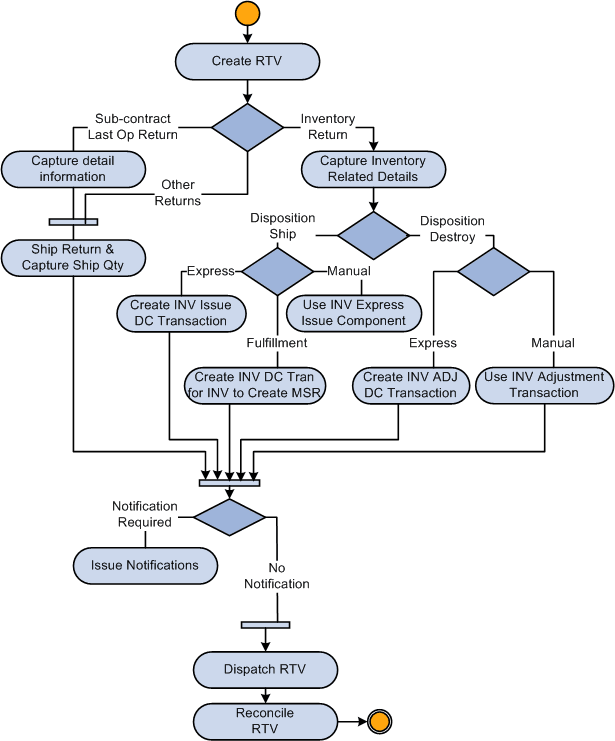
The diagram illustrates the streamlined process flow for RTV goods where, based on inventory details, you can ship, destroy, or fulfill returns to vendors:
Streamline Subcontract Processing
In manufacturing environments where part of the manufacturing process is subcontracted, you generally maintain and manage an internal manufacturing environment that processes production IDs, bills of materials, and routings. You can use Purchasing RTV express processing where data-collection transactions, such as subcontract completions or negative completions, can be processed at the same time for PeopleSoft Purchasing and the Receiving component. Subcontract items represent services provided by a supplier. These items can be noninventory items that represent the actual supplier contribution in the build process. The subcontract item appears on the purchase order and PeopleSoft Accounts Payable invoices.
To use streamline subcontract processing, the system provides:
-
A Subcontract Streamline feature setting in user preferences.
-
A Streamline check box on the RTV line when the production ID has a value.
The system automatically deselects the Streamline check box if the SetID for the RTV business unit does not exist in the data collection setup.
-
Validation routines to ensure that values such as serial ID, lot ID, and production ID are valid in the PeopleSoft Inventory business unit.
-
A link to storage locations so that storage areas and storage levels for inventory-related RTV detail rows so that you can specify the picking location.
-
Support for negative production completion and scrap streamline for subcontract RTVs so that you can process the RTVs when completions are finished for the associated receipt.
This is accomplished using data-collections functionality to process subcontract-related RTV lines. You enable the functionality using the Receiver / RTV Setup link on the Procurement User Preferences page. Select the Subcontract Streamline check box option on the Receiver Setup page. The RTV component creates data-collection transactions for negative production completion and production scrap for the operation that you are returning against. The system automatically submits the Production Completion process to the Process Scheduler to complete the return.
When the source for a RTV line is a receipt line that is serial or lot controlled, you must select the appropriate receipt detail row that contains the serial or lot ID from the time of receipt. That value is then copied to the RTV detail row. The system copies the serial and lot control indicators from the receipt line to the RTV line, after which you cannot change the RTV line. The serial and lot control is always deselected for subcontract RTV lines when the operation sequence is not the last operation sequence.
The serial ID and lot ID appear for lot- and serial-controlled items when the operation sequence is the last operation for the production ID. The item ID that the system uses for serial and lot validation is the assembly item ID, not the item ID from the purchase order line, receipt line, or RTV line.