Understanding the RTV Business Process
There are a variety of business reasons for initiating a supplier return. You may receive defective materials, too many items, items shipped in error, or items that you no longer require. When you return goods or services purchased from a supplier, you enter an RTV transaction in PeopleSoft Purchasing. Typically, this RTV transaction specifies the purchase order from which the materials were acquired; however, returns can be processed in PeopleSoft Purchasing without referencing the original purchase order if this detail is no longer available.
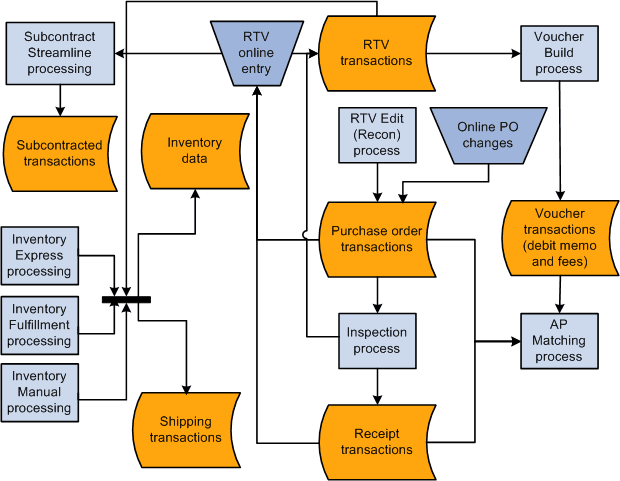
To initiate the RTV process, identify the items being returned to the supplier by entering descriptive information such as the supplier ID and supplier RMA (return material authorization) number in the RTV component. These pages provide various selection criteria that enable you to locate the correct purchase order or receipt line and other information to process the return. An RTV transaction can impact other areas such as inventory levels, payables credits, assets, and supplier performance statistics. You can use a streamlined RTV process for inventory and subcontracting transactions.
These are the basic steps in RTV transaction processing:
-
If available, determine the source purchase order and receipt to associate with the RTV.
-
Create the RTV using the Return to Vendor page and related pages.
-
Ship the return to the vendor.
Close the RTV transaction using the RTV Reconciliation Application Engine process (PO_RTVRECON). This prepares the RTV for PeopleSoft Payables processing.
-
Run the Voucher Build Application Engine process (AP_VCHRBLD) to stage the adjustment voucher.
-
Create the adjustment voucher in PeopleSoft Payables.
This diagram illustrates a more detailed view of the process:
Related Topics